I Replaced Google With Free AI 30 Days — Honest Result 2026
212 searches tracked across 5 categories · What surprised me · What failed · 4 things Google still winsIt started on July 1 with a simple rule: for 30 days, I would open Perplexity before I opened Google. If Perplexity answered my question well, that was the end. If it failed or gave me something wrong, I would note it and move to Google. After 30 days I would count what happened.
I was not trying to prove anything. I run MeetAITools.com and test AI tools daily — this was a practical experiment to understand whether my own search workflow actually needed Google the way I assumed it did. The result changed how I search every day. It also revealed four specific situations where Google is still significantly better than any free AI tool available right now, and I want to be honest about those too.
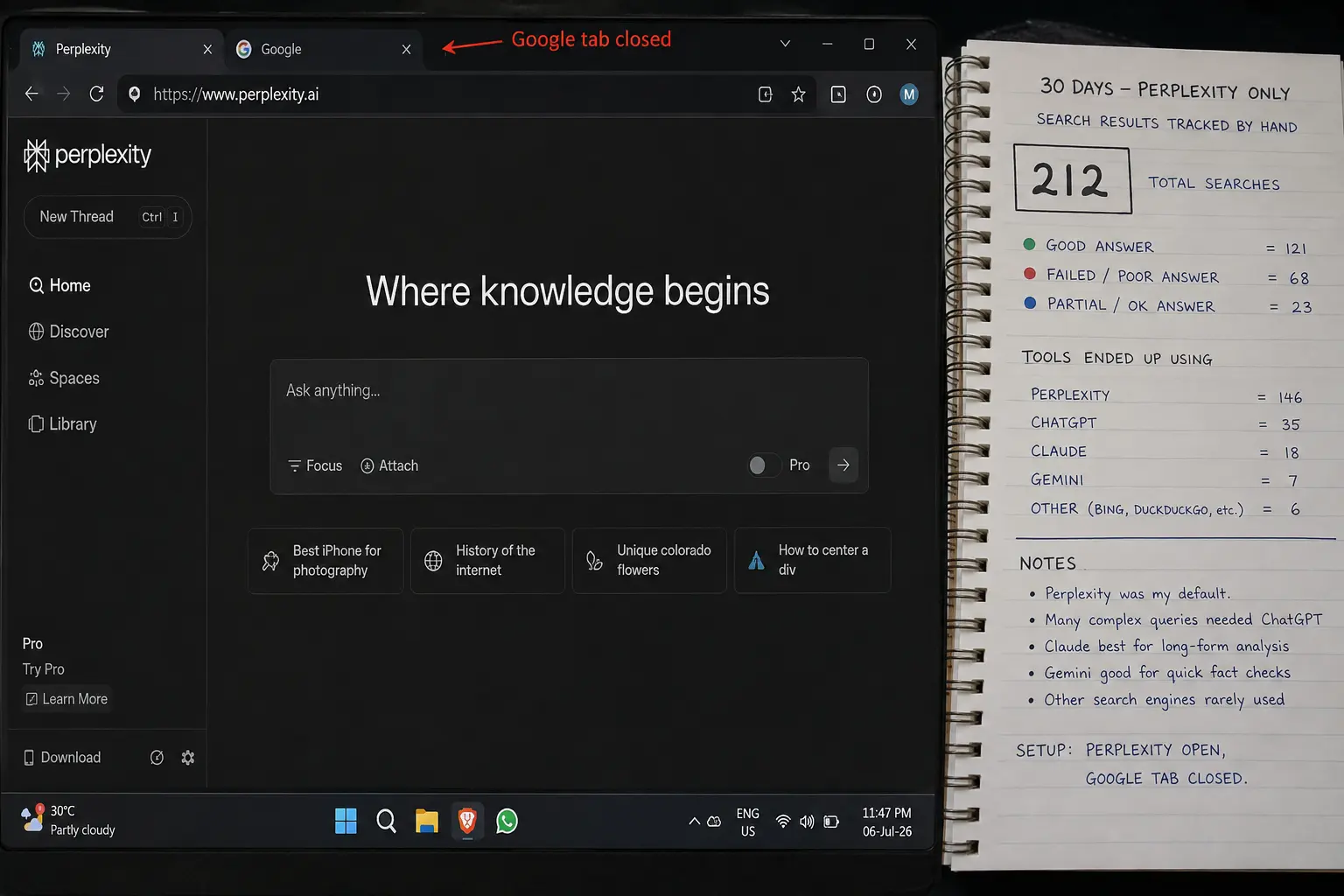
The Setup — How I Replaced Google With Free AI 30 Days
Before the results: here is exactly what I used and how. Everything on the free tier, no paid subscriptions.
My Free AI Search Setup — July 2026
The categories I tracked: research and factual questions, current news and recent events, local searches, product and shopping searches, and everyday miscellaneous questions. That is the range of what I actually search on a typical day — nothing exotic.
What Happened — The Week-by-Week Honest Account
Rather than a summary verdict upfront, I want to walk through what this actually felt like week by week. The experience shifted as the month went on, and that shift is part of the story.
Days 1–7
Days 8–14
Days 15–21
Days 22–31
Category by Category — Where Free AI Won and Where Google Still Wins
Here are the results broken down by the five categories I tracked. I have cited independent testing data alongside my personal results so you can verify the patterns I observed.
This category was not close. For anything that required synthesising information from multiple sources — comparisons, explanations, background research, “what is the best X for Y” — Perplexity consistently saved me significant time. The key difference is what the two tools actually give you. Google gives you links to articles that might contain the answer. Perplexity gives you the answer with links to articles you can verify.
On accuracy: independent testing by aitoolduel.com in April 2026 found that Perplexity produced accurate, well-organised answers approximately 87% of the time on complex, multi-part research questions, with errors typically manifesting as subtle misattributions or outdated information presented as current. My personal results were similar — I found Perplexity wrong or meaningfully incomplete on roughly 12 of 68 research searches. Every time it was wrong, the inline citations made it catchable. Google’s AI Overviews were harder to verify and in the same testing performed worst across accuracy tests with an error rate around 18% on complex informational queries.
My winner: Perplexity free. Not because it is perfect, but because when it is wrong you can see why and check. Google AI Overviews gave me confident wrong answers with no obvious way to trace the error back to a source.
This one surprised me. Perplexity handled news from the last week very well — better than I expected. Ask it “what happened with X this week” and it synthesises recent coverage into a clear summary with dated sources. That is genuinely useful for catching up on something you missed.
Where it broke down: anything from the last 24–48 hours. Breaking news, live sports scores, stock prices, weather right now. Perplexity’s web crawl is fast but not instant. Google News, by contrast, shows articles published minutes ago with timestamps. For anything truly current, Google won easily. Perplexity’s strength is research on fast-moving topics — AI model benchmarks, financial results, recent studies — where it often pulls from the most recent available sources. But for breaking news, Google News remains the stronger choice.
My winner: Split. Perplexity for “what happened this week.” Google for “what is happening right now.”
This was the clearest loss for free AI tools and the most practically important one. “Pharmacy open Sunday near me.” “Best rated restaurant within 2km.” “Bus route from X to Y.” Every AI tool I tested — Perplexity, ChatGPT search, Brave AI — either gave me outdated listings, wrong opening hours, or sent me back to Google Maps directly.
The restaurant incident in week three was the most memorable failure: Perplexity confidently listed opening hours that turned out to be from an old Google Maps listing. The restaurant had changed its hours months earlier. I turned up and it was closed. Google is unmatched for local search, maps, shopping, images, and quick navigation — every AI tool tested performed poorly on local and location-dependent queries.
My winner: Google. No competition. Google Maps has real-time business data, user-verified hours, live traffic, and a navigation layer that no AI search tool is close to replicating.
AI tools are useful for product research — “what should I look for in a router” or “is X worth buying” — but for actual shopping they fall short. Price comparisons with live pricing, product availability, delivery times, seller ratings — none of the free AI tools I tested handled this reliably.
Perplexity was the best of the AI options here and it was honest about the limitation — it would give me good background research on a product and then tell me to check the retailer directly for current pricing. That honesty is useful, but it still means opening Google Shopping or going directly to an online store. For shopping searches, the free AI tools were research assistants, not search replacements.
My winner: Google Shopping for actual purchases. AI tools for research on what to buy before you buy it.
“How do I fix this error in my code.” “What does this word mean in context.” “Explain this concept simply.” “Is this normal.” “What should I do about X.” These are conversational, contextual questions that Google was never designed for — it gives you links to articles that may or may not answer what you actually meant. Perplexity and ChatGPT search both gave me direct answers to direct questions in a way that felt more useful than ten blue links.
The only exceptions: anything requiring Google’s Knowledge Graph (celebrity bios, quick facts, unit conversions, quick calculations) where Google’s instant answer in the search bar is faster than waiting for an AI response.
My winner: AI tools for conversational questions. Google for instant factual lookups.
The 30-Day Scorecard
Overall across all 212 searches: free AI tools gave a better answer than Google on approximately 62% of queries. Google gave a better answer on 38%. The split maps almost exactly to the type of query — AI wins on information and research, Google wins on local, commercial, and real-time queries.
The 4 Things Google Still Does Better Than Any Free AI
I want to be clear about these because every article about AI replacing Google glosses over the failure cases. These are real limitations that affected my daily life during the 30 days, not theoretical edge cases.
Google Still Wins — Verified From 30 Days of Testing
One Thing That Surprised Me — The Ads Question
I went into this experiment thinking about search quality. I came out also thinking about ads.
Perplexity tried advertising in 2024, then pulled the whole approach in early 2026. According to a report in the Financial Times, a Perplexity executive said “the challenge with ads is that a user would just start doubting everything” — so they switched to a subscription model instead. The free tier currently shows no ads.
Google, meanwhile, has AI Overviews appearing on roughly 48% of queries now, sitting above sponsored results, which are themselves above organic results. The information density has dropped significantly from what Google search looked like even three years ago.
ChatGPT introduced ads on its free tier in February 2026 — I noticed them during this experiment and they did not affect answer quality, but they changed the feel of the tool. Perplexity free, Brave Search AI, and DuckDuckGo all remain ad-free as of this writing. That matters for how much you trust the answers you are reading.
→The Search Workflow I Use Now — After 30 Days
I did not stop using Google. But I use it for a much smaller slice of my daily searches than I did before July 1. Here is the honest workflow that came out of 30 days of testing — the same setup I still use today.
Default first stop: Perplexity free. Any research question, any factual question, any “explain this to me”, any comparison, any question where I need to verify a claim. The cited answers changed my relationship with AI search — being able to click a citation and confirm the claim is fundamentally different from trusting an AI summary blindly.
Second stop for conversational follow-up: ChatGPT free search. When I want to ask a follow-up question, explore an idea further, or get help with something that requires more back-and-forth than a single search result provides.
Privacy-sensitive searches: Brave Search AI. Anything I do not want tied to a search profile. Health questions, financial questions, personal decisions. Brave searches the web without building a profile on you and the AI answers are good for most queries.
Back to Google for four things only: local businesses with live hours, maps and navigation, breaking news from the last hour, and product shopping with current pricing.
That split means I now open Google for perhaps 35–40% of what I used to search there. The other 60–65% is handled better by free AI tools. Whether that represents “replacing Google” depends on your definition — I would say it represents using Google for what it is still best at, and using better tools for everything else.
→