Free AI Tools That Don’t Require Account — What Works in 2026
What genuinely works without registering — and what quietly asks you to sign up three messages inMost guides about free AI tools that don’t require an account are lists of tools where the writer tested one or two messages and declared them “no account required.” The reality is messier. Some tools work without an account for a handful of messages and then put up a sign-up wall. Some work without an account but still collect your session data. And one category — offline AI tools — requires no account, no email, no internet, and no data collection, but almost nobody writing these lists has ever mentioned them.
I have been running MeetAITools.com and testing free AI tools daily, so I have hit these limits in actual use. This guide separates which free AI tools that don’t require account creation genuinely work from what just claims to.
The Distinction Nobody Makes: No Account vs No Data Collection
Before the tool list, this is worth saying clearly because most no-login AI articles skip it entirely.
Most cloud-based free AI tools that don’t require account registration still collect data from your session. Your IP address is visible to the provider. Your messages may be used for safety monitoring or product improvement under the tool’s privacy policy. Some store anonymous session data for analytics. The difference from a registered account is that nothing is tied to your name or email — but the data still flows through their servers.
Offline tools — Jan AI, GPT4All, PocketPal — work completely differently. The AI model runs on your own device. Nothing you type leaves your machine. There is no server to collect data from because no server is involved. This is the only category of free AI tool with no account where “private” is genuinely accurate, not just relatively private.
Three Tiers of “No Account Required” — In Honest Terms
After testing these free AI tools that don’t require account creation, I find it useful to think in three tiers:
Tier 1 — Truly no account, cloud: Works without registration, has a session limit, still passes data through servers. Good for quick tasks. Not truly private.
Tier 2 — No account but asks after a few messages: Starts without sign-up but puts up a registration wall at 3–10 messages. Technically no account to start, but not usable for real work without eventually registering.
Tier 3 — Offline, no account ever: Runs on your device. No server. No account. No limit. No data collection. Takes setup effort but is the only option that is both truly unrestricted and genuinely private.
The Free AI Tools That Don’t Require Account — What Works in 2026 — Tested
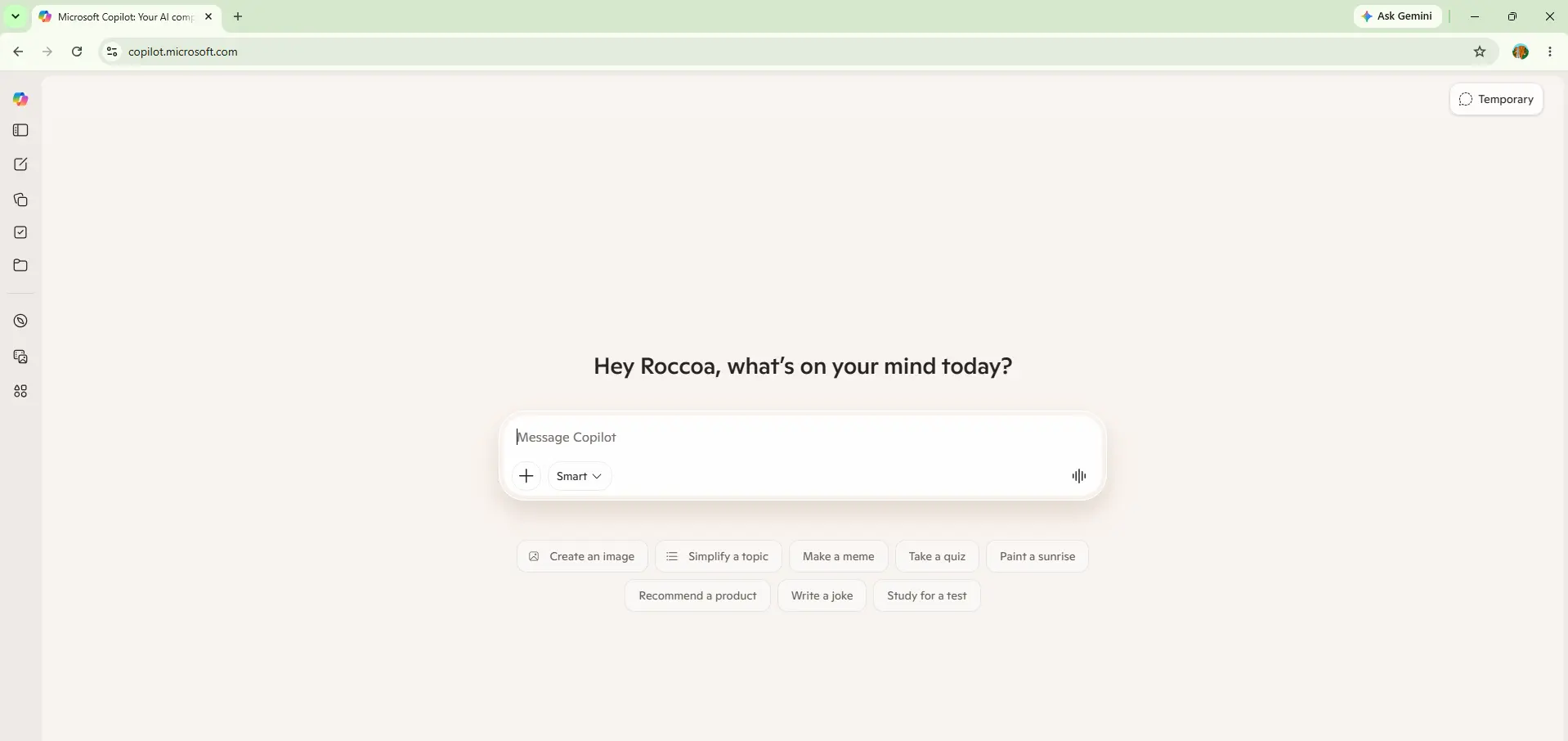
Copilot on desktop is the best no-account AI experience in 2026. Go to copilot.microsoft.com, start typing, and you are in — no sign-in, no prompt, no friction. Guest mode supports around 30 messages per session before prompting login, and it includes Bing Search integration for real-time web results. That is roughly three times the no-account limit of ChatGPT guest mode.
One important caveat that most guides miss: Copilot on Edge for Android recently removed guest access on InPrivate mode and now requires sign-in on mobile. If you are on a phone and want no-account Copilot, this no longer works as of a few weeks ago. On desktop it is still the strongest no-account option available.
Perplexity is the most generous no-account AI for research. Standard searches are unlimited without an account — you only hit a cap on Pro searches, which are limited to 5 per day for guests. Every answer comes with citations to the original sources, which makes it particularly trustworthy for fact-checking and research tasks where you need to verify information.
The limitation is focus — Perplexity is a research and search tool, not a general writing or coding assistant. If you want to draft an email or help with code, it will do it, but that is not what it is built for. For looking things up quickly without registering anywhere, it is genuinely excellent — one of the free AI tools that don’t require account sign-up where the experience is not degraded compared to the registered one.
ChatGPT’s guest mode works — go to chatgpt.com and click “Stay logged out.” But the no-account experience here is the most restricted of any major tool. Guest access gives around 10 messages per five-hour rolling window using an older model version, not the current GPT-5.3 that free registered accounts get. No image generation, no voice mode, no saved history.
For a truly one-off question, it is fine. For anything resembling real work, the 10-message limit runs out fast and the model quality gap is noticeable. Creating a free ChatGPT account — which costs nothing beyond an email — gives you a significantly better experience and is worth doing if you use ChatGPT regularly.
Duck.ai is the most privacy-conscious of the no-account cloud options. Built by DuckDuckGo, it routes your messages through their infrastructure to strip identifying information before they reach the underlying AI models. No account is ever required and DuckDuckGo states they do not store your conversations. The models available include GPT-4o mini and Claude Haiku, which are solid for everyday tasks.
The trade-off is capability — you are accessing smaller, faster model variants rather than the latest flagship models. For everyday questions, writing help, and quick tasks, Duck.ai is genuinely strong. For complex reasoning or long documents, the model ceiling is more noticeable.
HuggingChat gives you direct access to open-source AI models without an account. Where Copilot and ChatGPT guest mode give you a restricted version of proprietary models, HuggingChat gives you full access to models like Llama 3.3, Mistral, and Qwen — just without the polish of a commercial product. The interface is straightforward, web search is available, and the message limits are more generous than most cloud no-login options.
The honest trade-off: these are open-source models, not fine-tuned commercial products. Output quality varies by model choice and is generally good but occasionally less polished than GPT or Claude. For users who care about using open-source AI, HuggingChat is the best no-account option available.
The Option Nobody Mentions: Offline AI Tools
Every guide about free AI tools that don’t require an account lists the cloud tools above and stops there. None of them mention Jan AI, GPT4All, or PocketPal — the offline AI tools that are genuinely superior to every cloud no-login option on the criteria that matter most: no account, no limit, no data transmission, and always available even without internet.
Offline AI tools like Jan AI run an open-source language model entirely on your own laptop. When you type a message, it is processed by your CPU — nothing is sent to any server. No account is ever created. No session data is collected. No message limit applies. You can use it on a flight, in a location with no internet, or with sensitive information you would never type into a cloud tool. The only requirement is a reasonably capable laptop and about 30 minutes of setup time.
Jan AI is the most complete answer to the question of free AI tools that don’t require an account. Download the app, download a model (the Qwen 2.5 7B model is around 4.7GB, downloaded once), and you have a capable AI assistant that runs permanently on your own machine. No account. No internet required after setup. No limit on messages. Nothing you type ever leaves your device.
The output quality with a good model on 16GB RAM is solid for everyday professional tasks — drafting correspondence, summarising documents you paste in, answering questions, explaining concepts. It is not as capable as GPT-5.3 on complex reasoning, but for the daily writing and research tasks most people use AI for, it is genuinely good enough. And the privacy and availability advantages are not available from any cloud tool, no matter how generous their no-login policy is.
GPT4All does the same thing as Jan AI — runs AI models locally on your device — but with a simpler installation process that is more accessible for people who are not technical. If Jan AI feels intimidating, start with GPT4All. The model selection is slightly smaller and the interface is a bit more basic, but the core experience is the same: no account, no internet during use, no data transmitted, unlimited messages.
All Tools at a Glance
| Tool | Account needed? | Limit without account | Data collected? | Best for |
|---|---|---|---|---|
| Microsoft Copilot | No (desktop) | ~30 msgs/session | Session data | General chat, web search |
| Perplexity AI | No | Unlimited standard | Session data | Research with citations |
| ChatGPT Guest | No | ~10 msgs/session | Session data | Quick one-off questions |
| Duck.ai | Never | Generous | Minimal (DuckDuckGo routing) | Privacy-conscious chat |
| HuggingChat | No | Generous | Session data | Open-source model access |
| Jan AI (offline) | Never | Unlimited | Zero | Privacy, daily work, offline |
| GPT4All (offline) | Never | Unlimited | Zero | Beginner offline AI |
Which of These Free AI Tools That Don’t Require Account Should You Use
It depends on what you actually need. If you want something working in the next two minutes with no setup: go to copilot.microsoft.com on a desktop browser and start typing. No account, real web search, around 30 messages before it asks you to sign in. That is the best immediate no-account experience available.
If you need research with sources you can check: Perplexity at perplexity.ai. No account, unlimited standard searches, every answer cited. Perplexity is search-focused AI that answers questions with real web citations.
If privacy is the actual reason you are avoiding accounts — not just convenience: install Jan AI. The 30 minutes of setup time is worth it because it is the only option where your conversations are genuinely private. Nothing leaves your device. No company policy to read. No session data to worry about. Once set up, it is also the most practically useful daily tool on this list because it never stops you with a message limit.
And if you decide that creating a free account is acceptable after trying the free AI tools that don’t require account sign-up above: Gemini free (Google account) and Claude free (Anthropic account) are the best no-cost AI experiences in 2026 that require registration — no ads, generous limits, and strong output quality. The registration is the only barrier, and both are worth it if you are comfortable with that.
→