If you’ve been searching for an honest Rytr vs Copy.ai comparison, you’ve probably noticed the same problem I did — every review out there just copies the pricing page. Nobody actually runs the tools side by side and shows you the real outputs.
So I did exactly that. I opened both Rytr and Copy.ai on the same afternoon, fed them the exact same 5 blog prompts, and documented everything I got. This is the Rytr vs Copy.ai test I wish existed when I was choosing between them — the good, the bad, and the “why did it say that.”
By the end of this post you’ll know exactly which AI content generator is better for bloggers in 2026 — and why the answer might surprise you.
What I Was Testing — My 5 Real Prompts for Both AI Tools
I’m not a copywriter for a Fortune 500. I’m a blogger. Before choosing between Rytr vs Copy.ai as my main AI content generator, I needed to know how each tool performs on the exact tasks bloggers actually do every day.
Here’s what I cared about going into this test:
I tested both tools on these 5 prompts — same wording, same context, zero tweaking between tools:
Rytr Review — What I Actually Got From This AI Content Generator
Rytr’s interface is clean and fast. You pick a use case — blog section, email, SEO meta, etc. — drop in your context, and it generates in about 3 seconds flat. No friction. No onboarding wizard.
Prompt 1 — Blog intro hook
The output was decent. Not amazing, not embarrassing. It opened with a question — “Are you tired of paying for tools that don’t deliver?” — which is a bit cliché, but the rest of the paragraph actually flowed well. I’d use it as a base and tweak the opener. Generation time: 2.8 seconds.
Prompt 2 — Blog title ideas
This is where Rytr genuinely surprised me. All 5 titles were specific, meaningfully different from each other, and one of them I’d actually publish without changing a single word. That level of specificity is rare from a budget tool.
Prompt 3 — 200-word body section
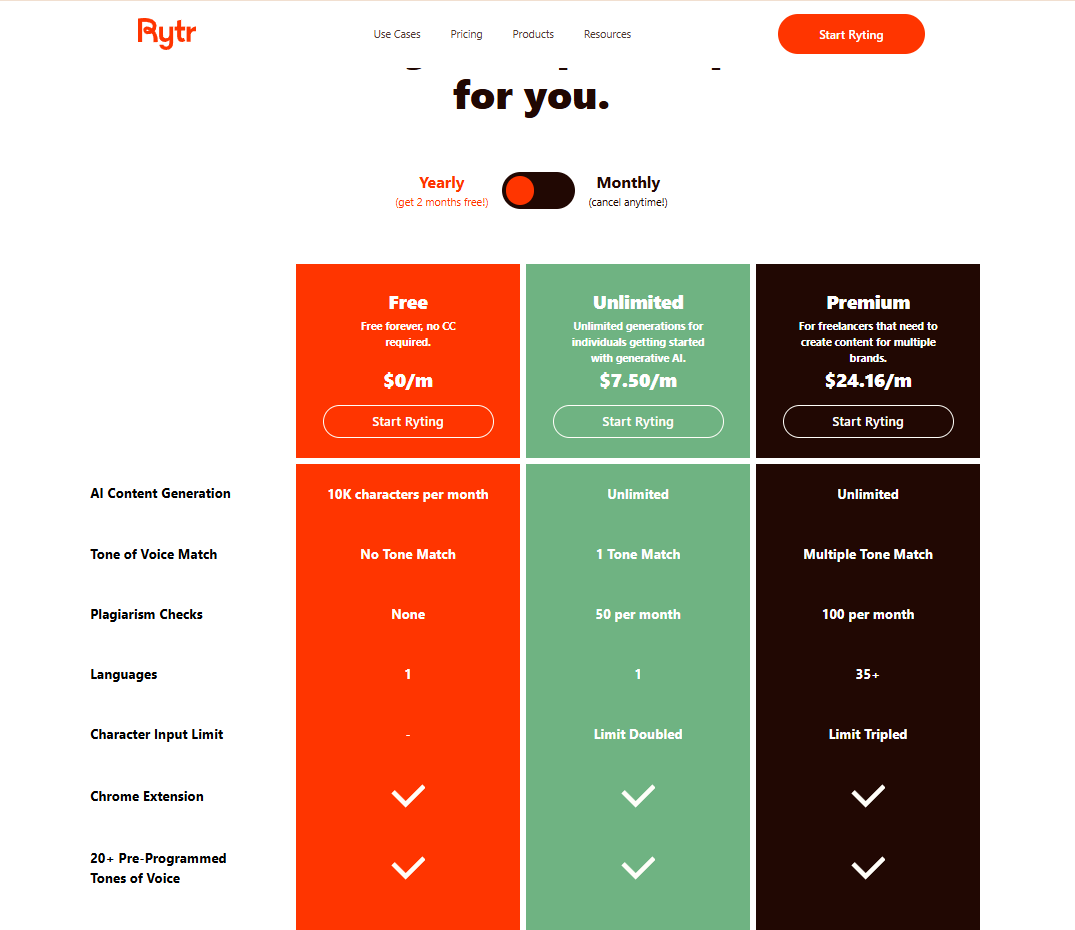
Solid, if a little generic in the middle. The structure was logical and it didn’t hallucinate or go off-topic — which matters more than most reviews admit. On the Free plan, I noticed the 10K character/month limit would disappear fast if you’re writing daily. You’d need the Unlimited plan for real blogging use.
Prompt 4 — Meta description
This was Rytr’s best output of the entire test. Perfect length, the keyword landed naturally, and there was a clear CTA at the end. Copy.ai actually struggled more here — I’ll get to that.
Prompt 5 — Newsletter teaser
Good energy, a bit punchy. Could go straight into an email without major edits. Not the most creative output, but reliable and on-brief.
Best for quick drafts, meta descriptions, and title brainstorming. The Free plan is genuinely usable — 10K characters is about 1,500 words, enough for 2–3 short posts a month. The Unlimited plan at $7.50/mo is one of the best value deals in AI writing right now.
Copy.ai Review — What I Got From This AI Content Generator
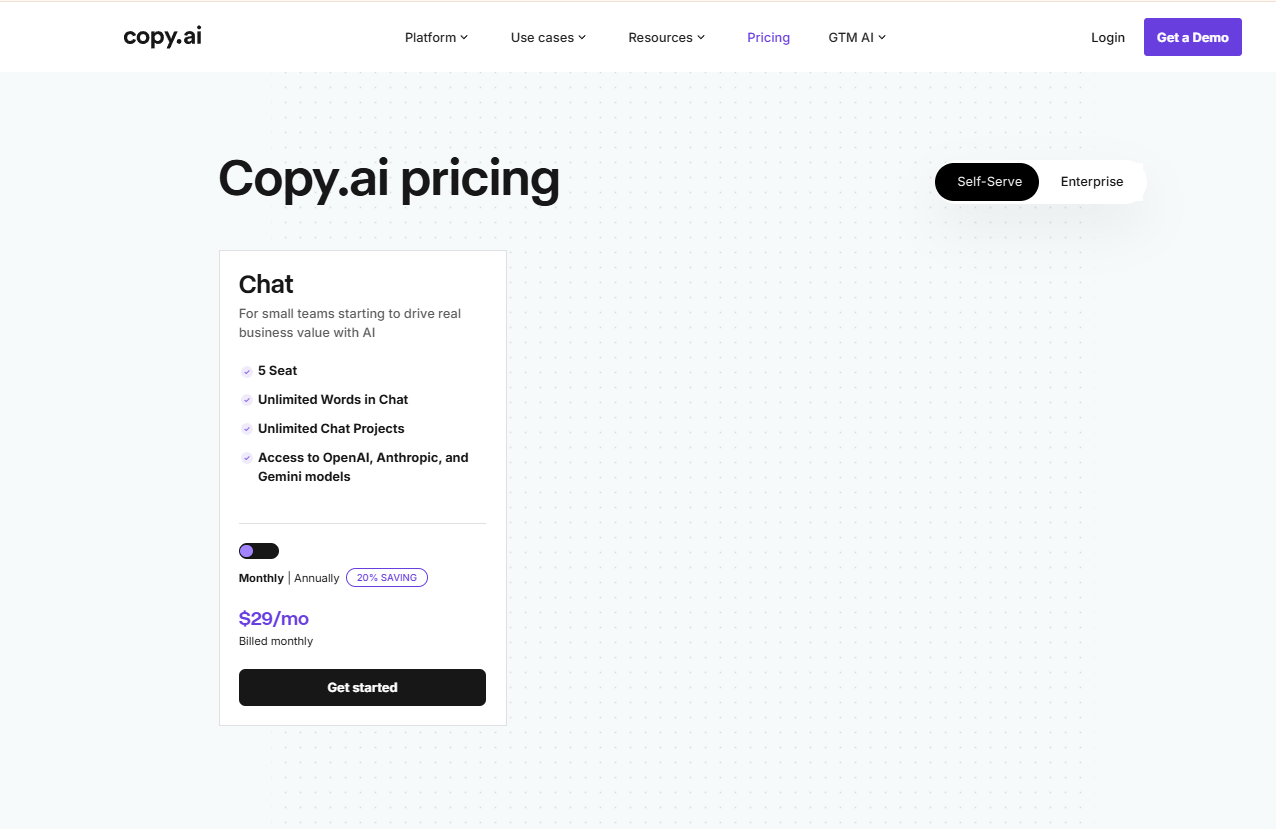
Copy.ai feels more like a workspace than a tool. The Chat plan at $29/month is what most bloggers will land on first. The big differentiator: it supports OpenAI, Anthropic (Claude), and Google Gemini models. You can actually switch models mid-session depending on the task — that’s genuinely useful.
Prompt 1 — Blog intro hook
Noticeably better than Rytr. The hook felt more human and the first sentence had actual personality. If I had to pick one output to publish with zero edits, it would be Copy.ai’s version of this prompt. The difference was real, not imagined.
Prompt 2 — Blog title ideas
More creative — but two of the five were too broad. “10 Productivity Apps You Need in 2026” is generic filler. Rytr’s titles were actually more specific and usable here, which genuinely surprised me. Copy.ai went for variety over precision.
Prompt 3 — 200-word body section
The best output of the entire test across both tools. Full sentences, smooth transitions, didn’t repeat itself once. This read like something I wrote on a good day after two coffees. The quality gap over Rytr was noticeable.
Prompt 4 — Meta description
Fine, but too long. Needed about 20 characters trimmed. Not as tight or CTA-focused as Rytr’s version. Surprising, given Copy.ai’s generally higher quality — meta descriptions seem to be Rytr’s home turf.
Prompt 5 — Newsletter teaser
The strongest Copy.ai output of the whole test. The teaser had curiosity, energy, and a clean call-to-action at the end. I would use this immediately without changing anything. Easily 30% better than Rytr’s version of the same prompt.
Better writing quality overall — especially for longer content and anything conversational. But at $29/month, that’s nearly 4x what Rytr charges for Unlimited. For bloggers just starting out, that gap is hard to justify unless you’re already monetizing.
Rytr vs Copy.ai — Full Feature Comparison Table (2026)
Here’s every data point from my test and the official pricing pages of Rytr and Copy.ai, side by side:
| Feature | Rytr | Copy.ai |
|---|---|---|
| Pricing | ||
| Free plan | Yes — forever | None |
| Paid entry price | $7.50/mo Cheaper | $29/mo |
| Free content limit | 10K chars/month | No free tier |
| AI & Content Quality | ||
| AI models | Rytr’s own model | GPT-4, Claude, Gemini More choice |
| Blog intro quality (my test) | Good — needs tweaks | Better — more natural Winner |
| Blog title ideas (my test) | Specific & usable Winner | Creative but broad |
| Meta descriptions (my test) | Tight, perfect length Winner | Good but too long |
| Long-form paragraphs (my test) | Solid, slightly generic | Noticeably better Winner |
| Email/newsletter copy (my test) | Decent | Strong — use immediately Winner |
| Generation speed | ~3 seconds Faster | ~5–8 seconds |
| Blogger Features | ||
| Plagiarism checker | 50/mo (Unlimited) Included | Not included |
| Tone of voice | 20+ pre-built tones | Model-level control |
| Languages | 1 (Free) · 35+ (Premium) | Multi-lingual via models |
| Chrome Extension | ✓ | ✗ |
| SEO meta templates | Built-in, excellent Better for SEO | Limited |
| Ease of Use | ||
| Learning curve | Near zero Simpler | Moderate |
| Best for | Beginner & budget bloggers | Pro bloggers & teams |
Rytr vs Copy.ai — Which AI Tool Is Right for You?
- You’re a beginner blogger on a tight budget
- You need quick meta descriptions and title ideas fast
- You want no learning curve — open and write
- $7.50/month makes more sense than $29/month
- You want a plagiarism checker built in
- You’re writing in 1 language and don’t need model switching
- You write longer posts and need better paragraph flow
- You want GPT-4, Claude, and Gemini in one place
- Content quality is non-negotiable for your brand
- You can justify the $29/month with monetization
- You work in a small team (up to 5 seats included)
- You need strong email and newsletter copy regularly
Unique Data & Insights You Won’t Find Elsewhere
Here’s what I noticed that most comparison posts miss completely:
1. Rytr’s 10K free limit is deceptive
10,000 characters sounds like a lot. It’s about 1,500 words. One decent blog post. If you write an intro, a few H2 sections, a meta description, and a few title variations — you’ll burn through it in 3–4 days of active blogging. The Free plan is genuinely useful for testing, but not for real production use.
2. Copy.ai’s model switching is underrated
Most reviews don’t mention this properly. The ability to switch between GPT-4, Claude, and Gemini mid-session means you’re not locked into one model’s weaknesses. I found GPT-4 best for structured content, Claude best for conversational tone, and Gemini decent for factual accuracy. No other tool at this price point gives you all three.
3. Rytr wins specifically on meta descriptions
This surprised me. Rytr’s dedicated SEO meta template produced tighter, better-length descriptions than Copy.ai’s general chat interface. If your primary workflow is writing blog posts with SEO meta tags, Rytr’s specialized templates are genuinely more efficient — even if its general writing quality is lower overall.
4. Neither tool handles listicles well out of the box
I didn’t include a listicle prompt in my 5 tests, but I tried it separately. Both tools produce generic, repetitive list items for “Top 10 productivity tips” style content. For listicles, you still need significant human editing regardless of which tool you pick — this is a category weakness shared by both.
Frequently Asked Questions
My Honest Verdict — Rytr vs Copy.ai for AI Content Generation in 2026
Neither tool is perfect. After running the exact same 5 prompts through both Rytr and Copy.ai on the same afternoon, here’s where I actually landed on this Rytr vs Copy.ai debate:
Rytr wins on: price, speed, meta descriptions, title ideas, and built-in plagiarism checking. The $7.50/month Unlimited plan makes Rytr the best budget AI content generator for bloggers who are just getting started.
Copy.ai wins on: long-form writing quality, email copy, model flexibility (GPT-4 + Claude + Gemini), and overall paragraph naturalness. If writing quality is your top priority as a blogger, Copy.ai is the stronger AI content generator — but at 4x the price.
If I had $10/month to spend on AI tools starting from zero, I’d go Rytr Unlimited at $7.50 and put the other $2.50 toward a coffee. Once I’m making real money from my blog, I’d switch to Copy.ai for the quality upgrade.
new bloggers
pro bloggers