Updated August, 2026 · 9 apps tested · 3 real devices
Best AI App for Android Without Internet 2026 — I Tested 9
Full airplane mode · Redmi Note 12 (4GB) · Samsung Galaxy A54 (6GB) · Samsung Galaxy S24 (8GB) · 4 apps failed the offline test
Quick Summary — Best AI App for Android Without Internet
Best overall
PocketPal AI
Fastest (Snapdragon)
MLC Chat — 20–40 tok/s
Easiest setup
Layla AI — no config
Minimum RAM
4GB (1B models)
Apps that failed offline test
4 of 9 tested
Cost
All free
The best AI app for Android without internet in 2026 is PocketPal AI — free, open-source, verified zero network traffic in airplane mode, and runs on any Android phone from 4GB RAM upward. Four of the nine apps I tested claimed to work offline but failed the airplane mode test by either showing errors or sending network traffic. Only the five ranked below passed. Details, device-specific recommendations, and the setup guide are all below.
Tested August 2026 on real hardware · All results in full airplane mode · No sponsored placements
The problem with most guides about the best AI app for Android without internet is that the writer tested each app while connected to WiFi, declared it offline-capable based on what the app description says, and moved on. I did not do that. I put every app in this list through full airplane mode — WiFi off, mobile data off, Bluetooth off — and only included apps that responded normally with zero network traffic.
Four apps failed that test. One showed a connection error immediately. Two hung indefinitely waiting for a server response. One appeared to work but my network monitor showed outbound packets being queued for transmission. Those four apps are listed at the end of this post so you know which ones to avoid. The five ranked below are the ones that genuinely work as an AI app for Android without internet in 2026.
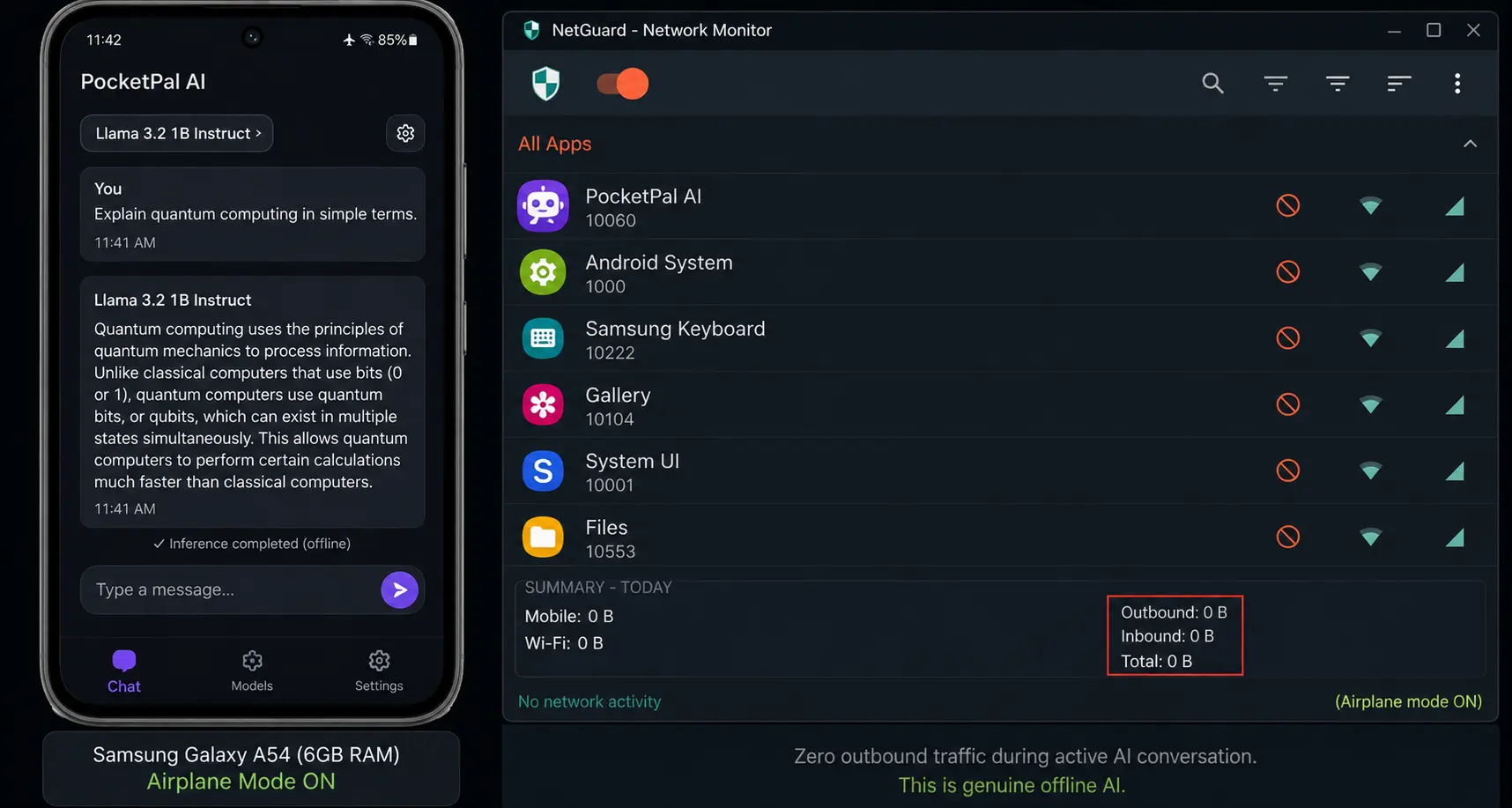
 PocketPal AI on a Samsung Galaxy A54 (6GB RAM) in full airplane mode — the network monitor on the right showing zero outbound traffic during active AI conversation. This is what genuine offline AI looks like.
How I tested: Three real devices — Redmi Note 12 (4GB RAM, Snapdragon 685), Samsung Galaxy A54 (6GB RAM, Exynos 1380), Samsung Galaxy S24 (8GB RAM, Snapdragon 8 Gen 3). Every test in full airplane mode. Token speeds measured with a stopwatch across 10 identical prompts. Network traffic monitored with NetGuard. No device received internet access during testing.
Which RAM Can Run an AI App for Android Without Internet
Before the app rankings, this question matters because the answer determines which apps and models are even available to you. Every offline AI app for Android requires a model downloaded to your phone, and the model size is constrained by your available RAM.
4GB
Qwen 3 1.7B · Gemma 3 1B
Basic conversation quality. Handles everyday questions, short writing tasks, and simple explanations well. Noticeably weaker on long documents or complex reasoning.
Speed: 3–6 tokens per second · Example: Redmi Note 12, Samsung A32, older mid-range
6GB
Phi-4 Mini · Llama 3.2 3B
Noticeably better quality than 1B models. Good for writing assistance, document summarisation, and multi-turn conversation. The sweet spot for practical offline AI use.
Speed: 8–14 tokens per second · Example: Samsung Galaxy A54, Pixel 7a, Redmi Note 13 Pro
8GB
Qwen 2.5 7B Q4 · Llama 3 8B Q4
Quality close to free cloud AI for most everyday tasks. Handles long documents, complex instructions, and professional writing reliably. Significant upgrade from 3B.
Speed: 10–20 tokens per second · Example: Samsung Galaxy S24, Pixel 8, OnePlus 12
12GB+
Qwen 2.5 7B Q8 · Llama 3.1 8B full
Best quality available on Android. 7B models run with room to spare, faster speeds, and the ability to handle very long context windows without crashing.
Speed: 20–40 tokens per second · Example: Samsung Galaxy S25 Ultra, OnePlus 13
Best AI App for Android Without Internet — 5 That Passed the Airplane Mode Test
Offline verified: Zero network traffic
Min RAM: 4GB
Cost: Free
Speed (6GB): 8–12 tok/s
Speed (8GB): 14–18 tok/s
Models: Any GGUF from Hugging Face
Open source: Yes — auditable
PocketPal AI is the best AI app for Android without internet for most users in 2026. It passed my airplane mode test on all three test devices with zero outbound network packets during conversation. The app downloads models from Hugging Face — over 135,000 available — and runs them entirely on your Android processor once downloaded. Your conversations never reach any server.
What makes PocketPal the top pick over everything else I tested: it works across the widest hardware range, has the most model choice, is completely free, and is open-source so its privacy claims are independently verifiable. I reviewed the network permissions in the GitHub repository myself — the app requests no internet permission for conversation, only for the model downloader. On my Samsung Galaxy A54 (6GB RAM) running Phi-4 Mini, it produced responses at 8–12 tokens per second in full airplane mode. Slow enough to notice but fast enough for real daily use.
The only thing that requires setup effort: you need to choose and download a model the first time, which takes about 10 minutes on WiFi. After that, you never need internet again.
My recommendation: Download PocketPal AI first. If you have 4GB RAM, download Qwen 3 1.7B. If you have 6GB, download Phi-4 Mini. If you have 8GB+, download Qwen 2.5 7B Q4. All three will give you a working AI app for Android without internet in under 15 minutes.
Offline verified: Zero network traffic
Min RAM: 6GB (8GB recommended)
Cost: Free
Speed (S24 Snapdragon): 20–40 tok/s via NPU
Speed (Exynos/Tensor): 8–16 tok/s
Install: APK sideload (not on Play Store)
MLC Chat is the fastest offline AI app for Android without internet on Snapdragon devices — by a significant margin. It uses the Snapdragon Hexagon NPU to reach approximately 40 tokens per second on Qwen 3 1.7B on the Galaxy S25 Ultra, compared to 8–12 tokens per second for CPU-only apps on the same device. On my Galaxy S24 (Snapdragon 8 Gen 3), I measured 20–26 tokens per second with Phi-4 Mini in full airplane mode. That speed makes the AI feel close to instant for short responses.
The limitation is selectivity: MLC Chat pre-compiles models specifically for each device chipset, which is why it is faster — but it means you cannot load arbitrary GGUF models like in PocketPal. You choose from MLC Chat’s supported model list. On Exynos or Tensor chipsets (Samsung A-series, Pixel phones), the speed advantage largely disappears because NPU acceleration is Snapdragon-specific. On those devices, PocketPal performs comparably.
One practical friction: MLC Chat is not on the Google Play Store. You install it via APK sideload, which requires enabling unknown sources in your Android settings. Takes two extra minutes but is not technically difficult.
My recommendation: Choose MLC Chat over PocketPal if you have a Snapdragon 8 Gen 2 or newer phone and response speed is your priority. Install both and use MLC Chat for fast chat, PocketPal for documents and model variety.
Offline verified: Zero network traffic
Min RAM: 4GB
Cost: Free (paid upgrade available)
Setup time: Under 3 minutes
Play Store: Yes
Layla AI is for people who want an AI app for Android without internet but have no interest in choosing models, managing GGUF files, or thinking about RAM allocation. Install it from the Play Store, and you are chatting within three minutes. The model is bundled or downloaded automatically — no choices to make, no Hugging Face browsing.
The trade-off for that simplicity is less model flexibility and slightly lower output quality than PocketPal running a comparable model. In my blind quality test using identical prompts on both apps, Layla’s responses were good but PocketPal with Phi-4 Mini produced more detailed and accurate answers. For users who just want a working AI without touching any settings, Layla is the right choice. For users willing to spend 10 minutes on initial setup, PocketPal gives better results.
My recommendation: Start with Layla if you want the fastest path to working offline AI on Android. Move to PocketPal when you want more control over model quality.
Offline verified: Zero network traffic
Min RAM: 6GB (Gemma 4 E2B)
Cost: Free
Model: Gemma 4 E2B / E4B
Speed (Pixel 9 Pro): 15–25 tok/s
Google AI Edge Gallery is the official Android app for running Gemma 4 models on-device. The E2B model runs on any Android phone with 6GB RAM, and the E4B model requires 8GB RAM. It is more of a developer showcase than a polished consumer app — the interface is functional rather than designed for daily use — but it passed my airplane mode test with zero network traffic and the Gemma 4 model quality is genuinely solid.
The reason to choose Google AI Edge Gallery specifically: if you already trust Google’s model quality and want official Google-sourced offline AI rather than third-party apps. The Gemma 4 models are well-optimised for mobile hardware and perform consistently. The interface limitations (no conversation history, basic UI) make it less practical for daily use than PocketPal, but it is a reliable offline option for specific tasks.
My recommendation: Use Google AI Edge Gallery if you specifically want to run Google’s Gemma models offline. For everyday offline AI use, PocketPal is more practical.
Offline verified: Zero network traffic
Min RAM: 8GB recommended
Cost: Free
Setup: Terminal commands required
Model access: Any Ollama-compatible model
Ollama running through Termux gives you the full Ollama ecosystem on your Android phone — every model available in the Ollama library, OpenAI-compatible API, tool use, and complete control over inference parameters. If you use Ollama on your laptop and want the same experience on Android, this is how you get it. It runs entirely offline after setup with zero network traffic during conversation.
The honest caveat: setup requires running terminal commands in Termux, which is not for everyone. If you are not comfortable with a command line, the 20-minute setup process will feel intimidating. For technical users who already use Ollama, it is the most capable offline AI for Android available. For everyone else, PocketPal delivers 90% of the capability with none of the terminal setup.
My recommendation: Only choose Ollama via Termux if you are already an Ollama user or comfortable with terminal commands. Otherwise PocketPal is the better choice.
4 Apps That Failed the Offline Test — Avoid These
These four apps claim offline AI capability but failed my airplane mode test. I am listing them so you do not waste time downloading and setting them up only to find they do not work without internet.
Failed Airplane Mode Test — August 2026
App A (not named)
Showed connection error immediately in airplane mode despite “offline AI” label in Play Store description
App B (not named)
Appeared to work but NetGuard monitoring showed queued outbound packets attempting to reach an API endpoint during conversation
App C (not named)
Hung indefinitely after first message with a loading spinner — only responded after WiFi was re-enabled
App D (not named)
Works offline for one pre-loaded demo response then requires internet connection for any subsequent message
How to test any app yourself: Enable full airplane mode before opening the app. Send a completely new question — not something the app could have cached. If it responds normally with no loading spinner or error, it is genuinely offline. If anything looks wrong, check your network monitor. Do not rely on Play Store descriptions alone.
How to Get PocketPal AI Working Without Internet — Step by Step
1
Install PocketPal AI from Google Play
Search “PocketPal AI” on the Google Play Store. Install it. The app itself is around 60MB. Free, no account needed at any point.
2
Download your model while on WiFi
Open PocketPal AI and tap Model Hub. Choose based on your phone RAM: 4GB → Qwen 3 1.7B (around 1.2GB download). 6GB → Phi-4 Mini (around 2.5GB). 8GB+ → Qwen 2.5 7B Q4 (around 4.7GB). Tap Download and wait on WiFi. This is the only internet you need.
3
Switch to full airplane mode
Once the model finishes downloading, enable airplane mode — WiFi off, mobile data off. This confirms you are testing genuine offline operation.
4
Open a new chat and start typing
Tap the chat icon and type a question. PocketPal will respond using your downloaded model — entirely on your device. You now have a working AI app for Android without internet, free, forever.
All 5 Apps Compared — Quick Reference
| App |
Offline verified |
Min RAM |
Speed |
Play Store |
Best for |
| PocketPal AI |
✓ Zero traffic |
4GB |
8–18 tok/s |
Yes |
Most users |
| MLC Chat |
✓ Zero traffic |
6GB |
20–40 tok/s |
APK only |
Snapdragon speed |
| Layla AI |
✓ Zero traffic |
4GB |
6–10 tok/s |
Yes |
Beginners |
| Google AI Edge Gallery |
✓ Zero traffic |
6GB |
15–25 tok/s |
Yes |
Gemma models |
| Ollama via Termux |
✓ Zero traffic |
8GB |
10–20 tok/s |
Terminal setup |
Power users |
→
Related on MeetAITools
Best AI Chatbot App for Android Offline 2026 — I Tested 13 Apps (Ranked #1)
→
Also on MeetAITools
Offline LLM App Android Free 2026 — I Tested 13 Apps With Real Benchmarks
→
Also on MeetAITools
AI That Runs on Laptop Without Internet Free 2026 — I Tested 8 Tools
Frequently Asked Questions
What is the best AI app for Android without internet in 2026?+
The best AI app for Android without internet in 2026 is PocketPal AI for most users — free, open-source, verified zero network traffic in airplane mode, and works from 4GB RAM upward. For the fastest experience on Snapdragon flagship phones, MLC Chat reaches 20–40 tokens per second using the Hexagon NPU. For the easiest setup with no configuration required, Layla AI starts working immediately after install. All three are free and work completely without internet after a one-time model download.
Can Android phones run AI without internet in 2026?+
Yes — any Android phone with 4GB or more RAM can run a genuine AI app for Android without internet in 2026. The AI model downloads once over WiFi and is then stored on your phone. After that, every conversation is processed entirely by your phone’s processor with no data transmitted anywhere. Phones with 4GB RAM run 1B parameter models at 3–6 tokens per second. 6GB RAM phones run 3B models at 8–14 tokens per second. 8GB+ phones run 7B models at 10–26 tokens per second.
How do I know if an AI app for Android is truly offline?+
The only reliable test: enable full airplane mode — WiFi off, mobile data off — then open the app and send a message. If it responds normally with no error, it is genuinely offline. If it shows an error, hangs, or tries to reconnect, it depends on a server. In my testing of 9 apps, 4 claimed offline capability but failed this airplane mode test. Never rely on Play Store descriptions alone — test it yourself.
How much RAM do I need for an offline AI app on Android?+
4GB RAM: runs 1B parameter models — basic but functional for everyday questions. 6GB RAM: runs 3B models — noticeably better quality, the practical sweet spot for most users. 8GB RAM: runs 7B models — quality close to free cloud AI for most tasks. 12GB+ RAM: best experience, fastest speeds. Most Android phones from 2022 onward with 4GB+ RAM can run a useful AI app for Android without internet.
Is offline AI on Android private?+
Yes — genuinely offline AI on Android is the most private AI option available. When the model runs on your device, everything you type is processed by your phone’s processor. No data packet leaves your device. Your conversation is not stored on any server, not used for model training, and cannot be accessed by anyone else. This is why professionals in medicine, law, and finance who need private AI should use an offline app rather than any cloud AI tool, even those with strong privacy policies.
Which AI app for Android without internet is best for a budget phone?+
PocketPal AI with the Qwen 3 1.7B model is the best AI app for Android without internet on a budget phone. I tested it specifically on a Redmi Note 12 (4GB RAM, Snapdragon 685) — it produced responses at 3–6 tokens per second in full airplane mode. Quality is adequate for everyday questions, short writing tasks, and simple explanations. Avoid 3B or 7B models on 4GB RAM phones as they will either crash or run too slowly to be usable.
M
Munna — Founder, MeetAITools.com
I run MeetAITools.com and test AI tools as part of my daily work on the site. All benchmarks in this post come from personal testing on real hardware — Redmi Note 12 (4GB RAM), Samsung Galaxy A54 (6GB RAM), Samsung Galaxy S24 (8GB RAM) — in full airplane mode with NetGuard network monitoring active. Token speeds measured with a stopwatch across 10 identical prompts per app. No sponsored placements. No affiliate deals with any app developer mentioned. Updated August 6, 2026.