If you’re a social worker drowning in documentation and wondering whether AI can help without putting client confidentiality at risk, here’s the honest, complete answer: offline AI for social workers client confidentiality free tools exist, they genuinely work, and they solve one real problem — keeping your words off someone else’s server. They do not solve every problem, and this guide is equally clear about what they can’t do.
Focus keyword: offline AI for social workers client confidentiality free · Plain-language guide · Ethical guardrails included · August 2026
Yes — free offline AI tools like PocketPal AI and Jan AI run entirely on your own device, so nothing you type is sent to a company’s server. This is a real confidentiality advantage over consumer cloud tools like free ChatGPT. But offline does not mean automatically compliant with HIPAA, your agency’s policy, or your licensing board — and you should still never type a real, identifiable client’s name or unique details into any AI tool, offline or not. Use anonymized placeholders, draft with AI, then add real details back manually in your agency’s approved system.
📋 Table of Contents
- Offline AI for Social Workers: The Real Tension Behind Client Confidentiality
- What “Offline AI” Actually Means — In Plain Language
- Before You Type Anything: The Non-Negotiable Rule
- The 3-Question Test Before Using Any AI Tool
- Offline vs Compliant — Why These Are Different Things
- Free Offline AI Tools That Actually Work
- A Real Before/After Example
- A Safer Documentation Workflow
- What These Tools Cannot Replace
- Frequently Asked Questions
- Final Verdict
Offline AI for Social Workers: The Real Tension Behind Client Confidentiality
Social workers spend a disproportionate amount of their working hours on documentation rather than direct client contact, and AI genuinely can reduce that time. The tension is that the fastest way to use AI — pasting real session details into a consumer chatbot — is also the way most likely to put client confidentiality at risk.
This is not a hypothetical concern. Multiple professional guides for the field state it directly: privacy and confidentiality are paramount in social work, and using AI for sensitive client information raises genuine questions about data security, retention, and access that most workers don’t have time to research case-by-case.
At the same time, documentation is one of the heaviest administrative burdens in the profession — heavy enough that AI-assisted drafting tools have become a fast-growing category specifically aimed at social workers and clinicians, with claims of cutting documentation time by 40–60% when used well.
The honest position, and the one this guide takes throughout, is that both things are true at once: AI can meaningfully reduce your documentation load, and the way most people would instinctively use it (typing real client details into a free chatbot) is the wrong way to do it. This is exactly why offline AI for social workers client confidentiality free tools deserve a closer look — the rest of this guide is about using them the right way.
What “Offline AI” Actually Means — In Plain Language
An offline AI tool downloads its “brain” (the language model) onto your own phone or computer one time, using your home or office WiFi. After that, the app works without any internet connection at all — and because there is no connection, nothing you type can be sent anywhere, ever. Compare this to ChatGPT, Claude, or Gemini, which require an internet connection every single time you use them because the thinking happens on a remote server, not your device.
This distinction is the entire reason offline tools matter for this topic. Cloud AI tools transmit your input to a server you don’t control, every time, by design — that’s how they function. Offline tools physically cannot do this once set up, because the architecture has no server in the loop at all.
PocketPal AI’s own developers describe this directly: the app brings AI models to your phone “with no account, no cloud, no internet required,” and once a model is downloaded, “your conversations never leave it.” That’s not a privacy setting you have to remember to enable — it’s the only way the app works.
💡 The Key Distinction
“Private” and “offline” are not interchangeable. A cloud tool can claim to be private through a policy promise. An offline tool is private through physical architecture — there’s no server to send your data to in the first place. For confidentiality-sensitive work, architecture is a stronger guarantee than policy.
Before You Type Anything: The Non-Negotiable Rule
The rule that applies no matter which tool you use
Offline architecture protects your words from leaving your device. It does not protect you from your agency’s policy, your licensing board’s rules, mandated reporting requirements, or laws like HIPAA and equivalent confidentiality statutes in your jurisdiction. Those rules exist independently of which software you use.
Never type into any AI tool — offline or cloud — information that could identify a real client if anyone other than you ever saw the text:
- Full names, or first name plus a distinctive last name
- Exact home addresses or highly specific locations
- A rare combination of details (specific diagnosis + age + neighborhood) that narrows to one identifiable person
- Verbatim disclosures of abuse, self-harm, or illegal activity tied to a real identifiable client
This is not a tool-specific limitation. It’s the same caution experienced practitioners apply to any device, any note app, and any AI system, because the underlying risk — a record existing somewhere it shouldn’t — is the same regardless of the technology.
The 3-Question Test Before Using Any AI Tool
Rather than memorising a long compliance checklist, here is a simple test to run before you use any AI tool — cloud or offline — for anything touching client work.
If the answer is no or you’re not sure, stop and ask your supervisor before proceeding — regardless of how private the tool claims to be.
If yes, anonymize first — swap the real name for “Client A,” generalize the location, remove anything that narrows to one person.
Verify by checking whether the app requires an internet connection to function after setup. If it does, it is not offline, regardless of what its privacy policy claims.
If you can answer all three confidently, you’re using AI in a way that respects both your client’s confidentiality and your professional obligations. If any answer is uncertain, that uncertainty is the signal to pause.
Offline vs Compliant — Why These Are Different Things
“Offline” is a technical property. “HIPAA compliant” (or compliant with your local equivalent) is a legal and administrative status that requires a signed agreement, documented safeguards, audit trails, and breach procedures. A tool can be genuinely offline and still not meet your agency’s compliance bar, because compliance is about paperwork and process as much as it is about technology.
📋 What Offline Architecture Gives You vs What It Doesn’t
A note on enterprise cloud tools
Some clinical documentation platforms (the kind agencies pay $29–$60 per user per month for) do offer signed BAAs and formal HIPAA-aligned infrastructure. Those are a different category from the free, personal offline tools in this guide, and a different category from free consumer ChatGPT. If your agency already provides one of those, that may be the right primary tool — this guide is specifically about the free, offline category for workers who don’t have that budget or that infrastructure yet.
Free Offline AI Tools for Social Workers — Compared
| Tool | Platform | Cost | Account Needed? | Best For | Not For |
|---|---|---|---|---|---|
| PocketPal AI | Android / iOS | Free | ✅ Never | Drafting notes between visits, on your phone | Storing or organizing real client records |
| Jan AI | Windows / Mac / Linux | Free | ✅ Never | Laptop-based agencies, office documentation | Mobile fieldwork without a laptop |
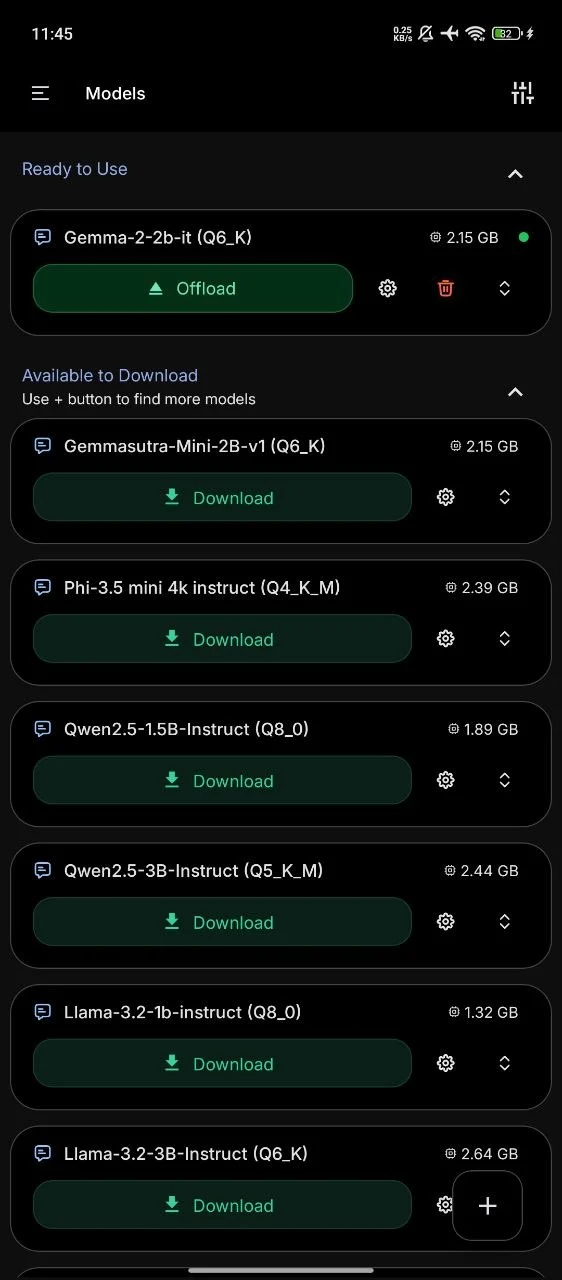
PocketPal AI is an open source app — meaning anyone can inspect the code that handles your data, rather than trusting a company’s word for it. It runs language models directly on your phone. You download a model once (a one-time process requiring WiFi), and from then on the app works with no internet connection at all.
For documentation, the practical use is straightforward: after anonymizing the details (Client A, general age range, general situation), you can ask it to structure your raw notes into a SOAP-style draft — Subjective, Objective, Assessment, Plan — which you then review, add real identifying details back into manually, and enter into your agency’s actual system.
✅ Strengths
- Genuinely offline after one-time setup
- Open source — privacy claims independently verifiable
- Free, no account, no subscription
- Works on a phone you already carry to visits
❌ Limitations
- Not a case management or record-keeping system
- No audit trail or access controls
- Requires 6GB+ RAM phone for usable performance
- Drafting quality is good but needs your professional review every time
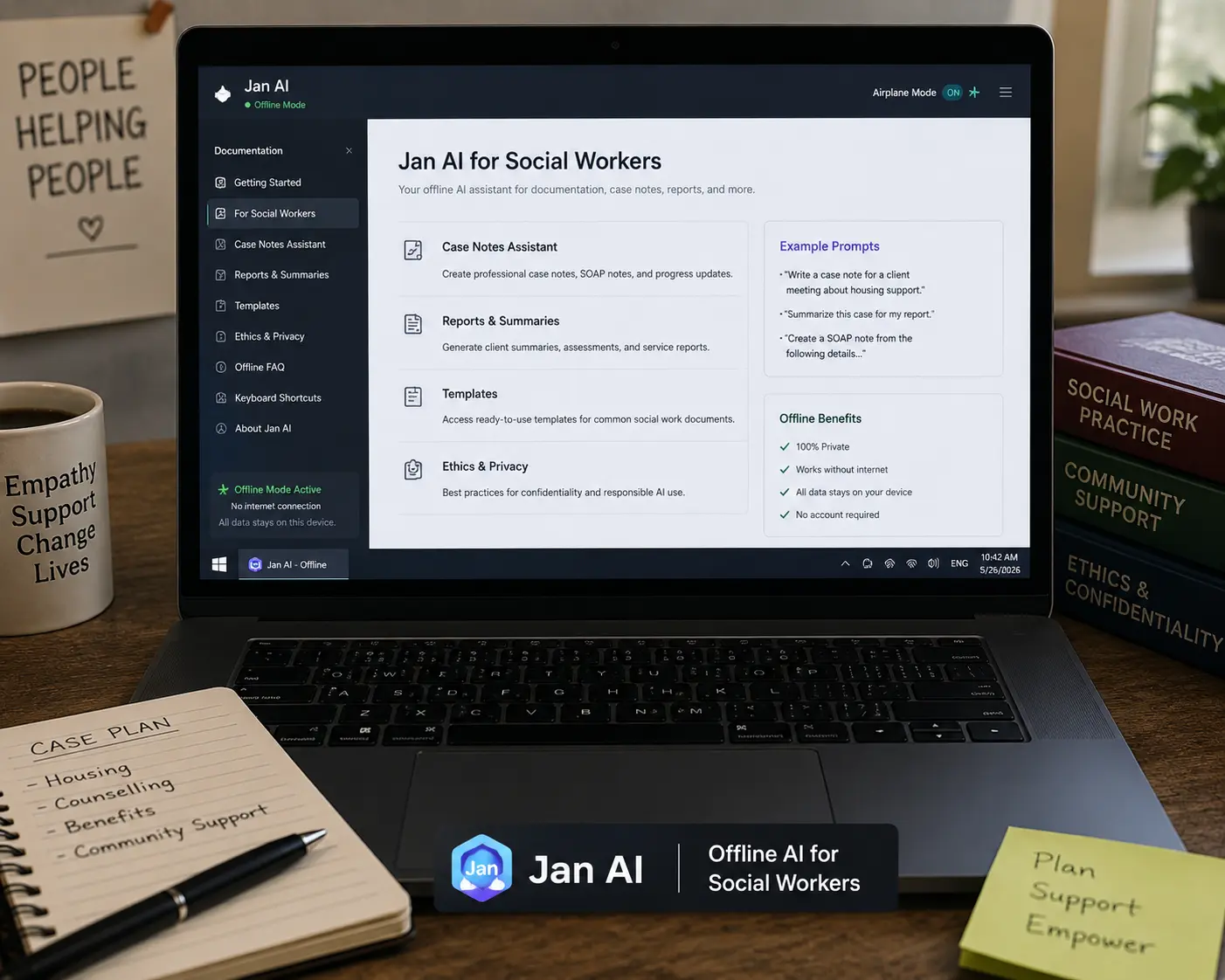
Jan AI offers the same core idea as PocketPal AI — a local model, downloaded once, running entirely on your own machine afterward — but built for desktop use rather than mobile. For workers who write up case notes at a desk between client visits rather than in the field, this is often the more natural fit.
✅ Strengths
- Genuinely offline, open source
- Clear, hardware-aware model selection
- Well-established with a large user base
❌ Limitations
- Requires a laptop, less convenient for fieldwork
- Same record-keeping limitations as any general AI app
A Real Before/After Example
Here is the practical difference between an unsafe prompt and a safer, anonymized one — using the same underlying situation.
“Write a case note. Sarah Mitchell, 34, of 14 Birchwood Close, disclosed today that her partner has been physically violent twice this month. She has two children, ages 6 and 9.”
“Write a SOAP-style case note draft. Adult client, mid-30s, reported two recent incidents of intimate partner violence this month. Two minor children in the home, school-age. Structure as Subjective, Objective, Assessment, Plan, and flag any safety planning considerations.”
The second version gives the AI everything it needs to produce a useful structural draft, while removing the specific identifiers that would make the note dangerous if it ever appeared somewhere it shouldn’t. You add the real name, address, and case file number back in manually when you transfer the draft into your agency’s official record.
A Safer Offline AI Documentation Workflow for Social Workers
Before using any AI tool for documentation, confirm with your supervisor whether your agency has a policy on AI-assisted note drafting. Some require explicit approval; some prohibit it outright for certain case types (e.g. child welfare, substance use records under 42 CFR Part 2).
Replace names with “Client A,” generalize ages and locations, and strip any detail combination that narrows to one identifiable person — as shown in the example above.
Use PocketPal AI or Jan AI to turn your anonymized summary into a structured SOAP or DAP draft, entirely offline.
Read the draft critically. AI can mis-structure clinical reasoning or flatten nuance — your assessment and clinical judgment remain entirely your responsibility, not the tool’s.
Enter the finished, reviewed note into your agency’s approved case management system, adding the real name and identifiers there — outside the AI tool entirely.
What These Tools Cannot Replace
To be direct about the limits: offline AI tools are writing assistants, not case management systems. They have no audit trail showing who accessed a record and when. They have no role-based permissions to control who on your team can see what. They have no built-in retention or deletion policy aligned to your agency’s record-keeping requirements. And they have no integration with your agency’s official system of record.
They also cannot replace your professional judgment. AI-generated drafts have been shown to sometimes flatten nuance, miss safety-relevant details, or reflect biases present in training data — a particular risk when working with marginalized populations who may already face systemic bias elsewhere. Every draft requires your full clinical review before it becomes part of an official record.
🔒 Related on MeetAITools Offline AI Tool for Real Estate Agents — No Internet at Showings 📄 Also on MeetAITools Offline AI Summariser PDF Free No Account 2026🏆 Final Verdict: Offline AI for Social Workers Client Confidentiality Free
Free, genuinely offline AI tools can meaningfully cut documentation time for social workers — but only when paired with anonymization habits and respect for your agency’s actual rules.