I tested five free AI tools that homeschool parents could realistically use for homework help, writing feedback, and explaining concepts, every single one running completely offline with no account, no email, and no sign-up. I’m a parent who covers offline AI tools on this site, not a child psychologist or an education researcher, so I’m going to tell you exactly what I found, including the part most articles about AI and homeschooling skip entirely: none of these tools were built with a child’s safety in mind by default, and that single fact should shape how you actually use them.
Focus keyword: free AI for homeschooling offline no account · 5 tools tested · Laptop + Android · Verified zero signal · Child-safety check included · August 2026
Read this before anything else
This article is written for the parent setting up the tool, not for a child to use unsupervised. None of the five tools tested here, GPT4All, Jan AI, PocketPal AI, Ollama, or LM Studio, include content moderation built specifically for children. PocketPal AI’s own documentation describes itself as having “no content policies imposed by us, no behavioral guardrails we decided for you.” That is the honest, accurate description of every tool in this category, not just one of them. Set the tool up yourself, test it with your own questions first, and stay involved the same way you would with any open internet access for your child.
Table of Contents
- Why I Tested This Instead of Just Recommending ChatGPT
- The Child Safety Question, Answered Honestly
- Who This Is Actually Right For
- My Test Setup, Verified With Zero Signal
- What Hardware You Actually Need
- Key Stats From My Testing
- Full Comparison Table, 5 Tools
- In-Depth Reviews
- More Options: Ollama and LM Studio
- What This Actually Helps With, and What It Doesn’t
- A Practical Setup Sequence for Parents
- Frequently Asked Questions
- Final Verdict
Why I Tested This Instead of Just Recommending ChatGPT
Most articles about AI for homeschooling point to ChatGPT, MagicSchool AI, or Khanmigo, and for plenty of families those are genuinely good options. But all three require an account, an internet connection every time they’re used, and your child’s questions and writing passing through a company server somewhere. For a homeschool parent searching specifically for free AI for homeschooling offline no account, that isn’t what they’re asking for. They want something that works without a sign-up, without a subscription, and without their child’s homework questions leaving the house.
So instead of writing another roundup of cloud tools, I installed five offline alternatives, GPT4All, Jan AI, PocketPal AI, Ollama, and LM Studio, on a real budget laptop and two real Android phones, turned off the internet completely, and used each one the way a homeschool parent actually would: asking it to explain a concept, draft writing feedback, and work through practice questions.
The Child Safety Question, Answered Honestly
I want to spend real space on this because it’s the part that matters most for this specific audience, and it’s the part competing articles either skip or gloss over.
Tools built specifically for K-12 education, like Khanmigo, are designed around Socratic questioning that guides a student toward an answer rather than handing it over, and they’re built with content boundaries appropriate for minors. That design work is intentional and it’s genuinely valuable. The five tools tested in this guide were not built that way. They are general-purpose local AI applications, built primarily for privacy-focused adults who want full, unrestricted control over their own AI, including the ability to run any model and ask it anything, with no content policy deciding what it will or won’t discuss.
That openness is exactly the feature that makes these tools appealing for privacy, and exactly the feature that means they are not pre-filtered for a child’s use. A local model running offline can still generate output a parent wouldn’t want a child to see, the same way an unfiltered web search can. The offline, no-account part of this guide solves the data privacy problem. It does not, by itself, solve the content supervision problem.
What I’d actually do as a parent
Set the tool up yourself first. Spend ten minutes testing it with your own questions before your child ever opens it. Sit with your child the first several times they use it, the same way you would for any new app. If you want a tool built specifically with child-safety guardrails and you’re comfortable with an account and an internet connection, Khanmigo is worth using alongside, not instead of, an offline tool, not in place of it.
Who This Is Actually Right For
You’re comfortable with your child asking an AI tool for help drafting an essay or working through a math problem, but you don’t want that conversation stored on a company’s server, tied to an account, or used to train a future model. Offline AI solves exactly this.
If your connection drops regularly or you’re managing data costs carefully, a tool that works once it’s downloaded, with zero ongoing internet requirement, removes a real daily friction point from homeschool work.
This guide is written for a parent who sets the tool up, tests it, and stays involved, not for a parent looking to give a child unsupervised access to general AI. If that’s not the level of involvement you’re looking to maintain, a dedicated child-safety-first platform is the better fit.
If you want a full, structured homeschool curriculum that tracks progress across a school year and adapts automatically to grade level, none of the five tools here do that. They are homework helpers and writing assistants, not curriculum platforms. Pair them with your existing curriculum rather than expecting them to replace it.
My Test Setup, Verified With Zero Signal
Every claim in this guide about free offline AI for homeschooling was tested with the connection physically off, the same standard I use for every offline AI guide on this site.
I downloaded each tool and a model while connected, then disabled all connectivity completely and used every tool exclusively in that state, asking the kind of questions a homeschool parent would realistically need help with: explaining a concept at a specific grade level, giving feedback on a short piece of writing, and walking through a math problem step by step.
What Hardware You Actually Need
This matters more for a homeschool household than most local AI guides admit, since you’re often working with whatever laptop or phone the family already owns, not a machine bought specifically for this.
Laptop and Desktop Tiers
Phone Tiers
My honest starting recommendation
If you have an older laptop with 8 GB of RAM and no graphics card, start with GPT4All. It was specifically built to run on exactly that kind of hardware, and the setup is the simplest of everything I tested. If your household leans on phones more than laptops, start with PocketPal AI instead.
Key Stats From My Testing
Full Comparison Table, 5 Free Offline AI Tools for Homeschooling
Here is the honest comparison of every tool tested for free AI for homeschooling offline no account.
| Tool | Platform | Min RAM | Account Needed | Child Content Filter | Best For |
|---|---|---|---|---|---|
| GPT4All | Win / Mac / Linux | 8 GB, no GPU OK | None | Not built-in | Old or budget laptops |
| Jan AI | Win / Mac / Linux | 8 GB | None | Not built-in | Daily homework helper |
| PocketPal AI | Android / iPhone | 4 to 6 GB | None | Not built-in | Phone-only households |
| Ollama | Win / Mac / Linux | 8 GB | None | Not built-in | Tech-comfortable parents |
| LM Studio | Win / Mac / Linux | 16 GB | None | Not built-in | Choosing the right model size |
None of the five tools include child-specific content filtering. This is true of the entire local AI category, not a weakness specific to one tool, and it’s the reason the setup guide further down recommends parent setup and supervision for all five.
In-Depth Reviews, Top 3 for Homeschool Use
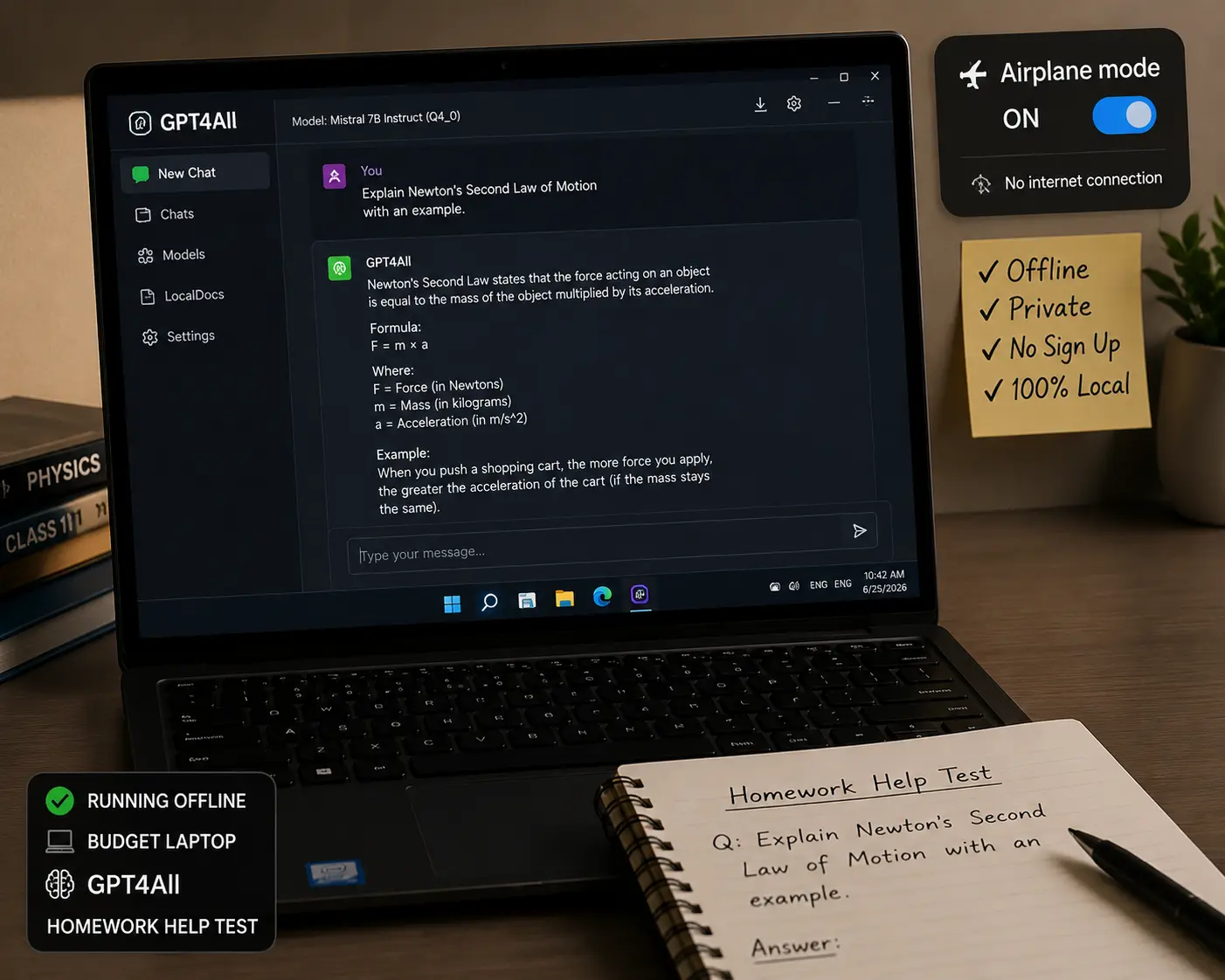
GPT4All was the easiest of the five to get running, and it’s specifically designed for laptops without a dedicated GPU, which matters for a homeschool household using whatever computer is already in the house rather than one bought for this purpose. The installer is a single download, there’s no account screen at any point, and the model list is short and curated rather than an overwhelming wall of options.
I tested it on the 8 GB budget laptop with airplane mode fully active, asking it to explain photosynthesis at a fourth-grade reading level and to give feedback on a short paragraph. It answered both reliably, with responses taking longer than a cloud tool would, generally 10 to 20 seconds, but nothing that felt broken or unusable. The built-in LocalDocs feature also lets you point it at a folder of your own files and ask questions about them, useful if you want it to reference a specific worksheet or reading passage you’ve already prepared, all processed locally with nothing uploaded anywhere.
It is open source under the MIT license and collects no usage data. The honest tradeoff is speed without a GPU, and the model selection is smaller than some alternatives, but for a parent who wants the simplest possible offline setup with zero account and zero internet after install, GPT4All was the most dependable starting point I tested.
Why GPT4All Wins for This Use Case
- Built for CPU-only laptops, no GPU required
- Zero account, zero sign-up, ever
- 3-minute install, single download
- LocalDocs lets it reference your own worksheets offline
- Open source, free forever, no telemetry
Real Limitations
- No built-in child content filtering, same as every tool here
- Noticeably slower than cloud AI without a GPU
- Smaller model selection than some alternatives
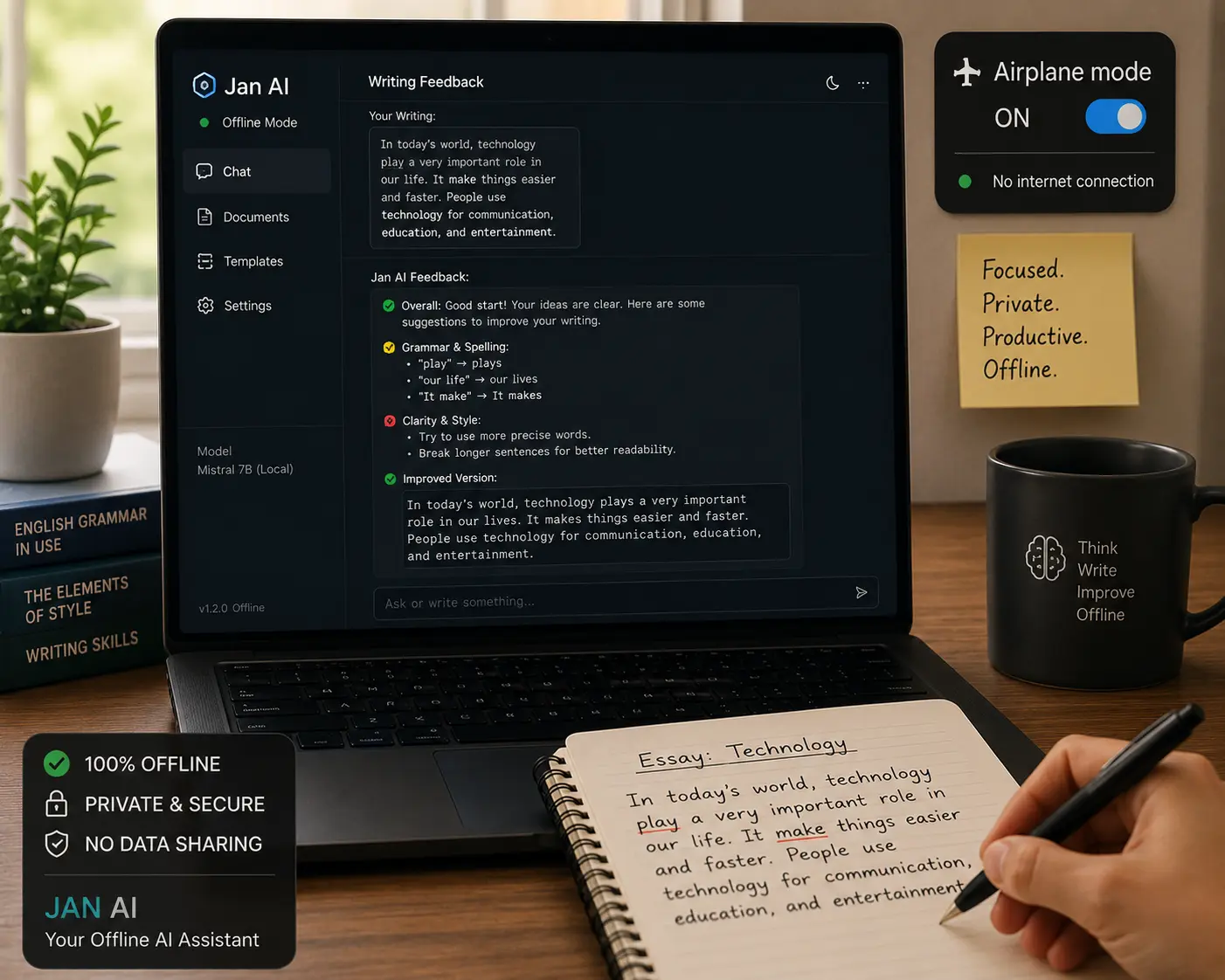
Jan AI is positioned as an offline-first alternative to ChatGPT, and for daily homework help that comparison holds up reasonably well. The interface looks and feels familiar, conversations sit in a sidebar, you can switch models, and there’s no account or login screen anywhere in the setup.
In testing, I used it across a multi-day stretch the way a homeschool parent actually would, asking for help drafting feedback on a short essay one day and working through fraction problems step by step another day. The conversation history made it easy to pick back up, and the file attachment feature let me drop in a short reading passage and ask comprehension questions about it, processed entirely locally. It is fully open source and built around zero telemetry by design, which I verified by checking for outbound network traffic during use in airplane mode, confirmed at zero.
The honest tradeoff against GPT4All is hardware. Jan AI is noticeably more comfortable on 8 GB of RAM and better still at 16 GB, while GPT4All is the better choice on the most limited hardware. If your laptop has the RAM for it, Jan AI was the tool I’d reach for as an ongoing daily homework helper over the others tested.
Why Jan AI Is a Strong Daily Option
- Polished, familiar chat interface, no terminal needed
- Zero account, zero telemetry by design, verified offline
- File attachments for reading passages, processed locally
- Conversation history makes ongoing homework sessions easier
Real Limitations
- No built-in child content filtering, same as every tool here
- More comfortable on 8 GB plus RAM than the most basic hardware
- Smaller community than some alternatives for troubleshooting
PocketPal AI is the most realistic option when a phone, not a laptop, is what’s actually on hand. It’s built to run language models directly on the phone itself, and the developer is direct about what that means, stating plainly that no content policies are imposed and no behavioral guardrails are decided on the user’s behalf. I want to flag that quote specifically here, because it is the clearest, most honest statement of the exact thing parents need to know before handing this to a child.
On the 6 GB RAM test phone, a small model loaded and answered homework-style questions, explaining a concept and walking through a simple math problem, at a reasonable pace once fully offline. On the 4 GB budget phone, the same setup worked but was slower, still usable, not fast. The setup process involves a brief initial connection to download a model from Hugging Face, after which the app needs nothing from the network again, verified with airplane mode fully active for the remainder of testing.
It is open source and auditable, and I confirmed zero outbound traffic during actual use. The tradeoff against a laptop tool is the smaller screen and slightly more manual model selection process, but for a family without a laptop available, this was the clearest path to a private, free homework helper.
Get PocketPal AI Free, Android and iPhoneWhy PocketPal Wins for Phone-Only Households
- Works on phones with as little as 4 GB RAM
- Open source, zero telemetry verified during use
- Zero account, free, no ads
- Honest documentation about what it does and doesn’t filter
Real Limitations
- Explicitly states no content guardrails, supervision matters most here
- Smaller screen makes longer homework sessions less comfortable
- Manual model selection takes a little more setup than a laptop app
More Options: Ollama and LM Studio
Ollama is the right tool if a parent in the household is comfortable with a terminal and wants to build something more specific, like connecting a local model to other homeschool tools or scripts. One command installs it, one command downloads and runs a model, and there’s no account at any point. It is not the tool to hand directly to a child, since there’s no chat window at all by default, but as a technical foundation it’s the fastest and lightest of everything tested. Get Ollama free
LM Studio has the clearest model browser of anything tested, showing RAM requirements plainly before you download, which is genuinely useful if you’re not sure what your laptop can handle. The honest limitation for a homeschool budget specifically is that it’s most comfortable on 16 GB of RAM, a step up from the most basic household laptop. If your hardware supports it, the browsing experience alone makes it worth trying. If it doesn’t, GPT4All or Jan AI are the more realistic starting points. Get LM Studio free
What This Actually Helps With, and What It Doesn’t
Honesty matters here more than almost anywhere else I write, given the audience. Here’s a clear picture of what free offline AI for homeschooling genuinely helps with, and where it hits a real limit.
What Offline AI Can Genuinely Help With
What Offline AI Cannot Replace, No Exceptions: It cannot replace a structured curriculum that tracks a child’s progress across a school year. It cannot guarantee every answer is correct, math errors and factual mistakes happen, especially with smaller models, so review the output before your child treats it as final. And it has no content filter built for a child’s use, which is the reason this entire guide is written around parent setup and supervision rather than independent use.
A Practical Setup Sequence for Parents
Before Your Child Touches Any of These Tools
Frequently Asked Questions
Final Verdict, Free AI for Homeschooling Offline, No Account, in 2026
Five tools tested, fully offline, zero account, zero cost, with one honest reminder that applies to every single one: