Why I Tested Every Best Free AI Content Generator I Could Find
Let me be completely honest. A while back I was drowning in content — three blogs, a newsletter, product descriptions, and social posts all at once, with zero budget. That’s when I started searching for any AI writing tool that didn’t cost money. What began as a survival move turned into a six-month deep dive where I personally tested every major AI writing platform claiming to have a usable free plan.
I didn’t just read other people’s reviews. I signed up, wrote with, pushed the limits of, and sometimes genuinely cursed at eleven different tools. I ran the same five test prompts across every single one — a 1,000-word blog post, a product description, three social media captions, an email subject line, and an SEO article outline — so the comparison is genuinely apples-to-apples. This post is everything I learned, written from real hands-on experience.
What I Looked for When Evaluating Each Tool
Here are the five criteria I used to judge every tool — all derived from painful trial-and-error, not from a press release.
Output Quality: Does the content sound human? Is it grammatically clean, logically structured, and useful out of the box — or does it need heavy editing every single time? I specifically checked for repetition, filler phrases, and factual errors in every output.
Free Tier Generosity: Some tools call themselves “free” but give you 500 characters and immediately hit you with a paywall. I tested what you can realistically produce on the free plan without a credit card. Several tools had to be downgraded in my ratings because their free tiers were essentially unusable demos.
Use Case Coverage: Can it write blog posts, social captions, email subject lines, and product descriptions? The more versatile the tool, the higher it ranks. A tool that only writes ad copy is useful but limited.
Ease of Use: I timed myself from signup to first content output on every single tool. A good AI writing assistant should take under five minutes to get started, not an entire afternoon to configure.
SEO Awareness: As a blogger, I need tools that understand keyword placement and produce content that search engines can parse. I tested heading structures, meta description generation, and keyword density handling on each platform.
Only 3 out of 11 tools produced content I could publish with less than 20 minutes of editing. The rest required significant rewriting — especially for anything requiring factual accuracy or nuanced opinion. The tools that performed best weren’t always the most popular ones.
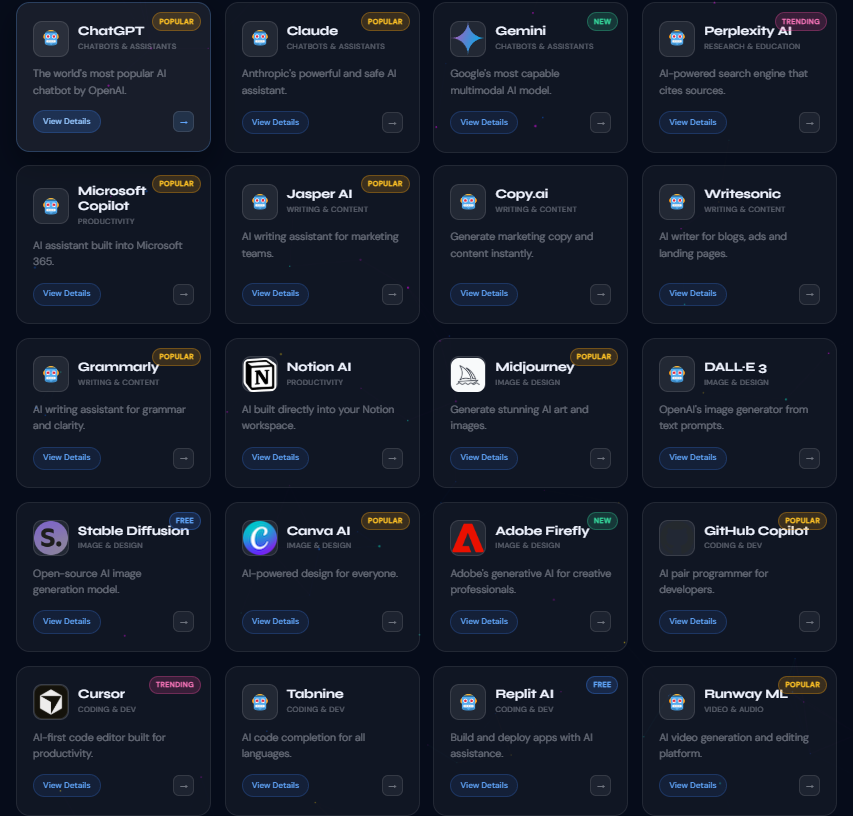
My Honest Reviews — All 11 Free AI Content Generators
1. Rytr — Best Free AI Content Generator for Beginners
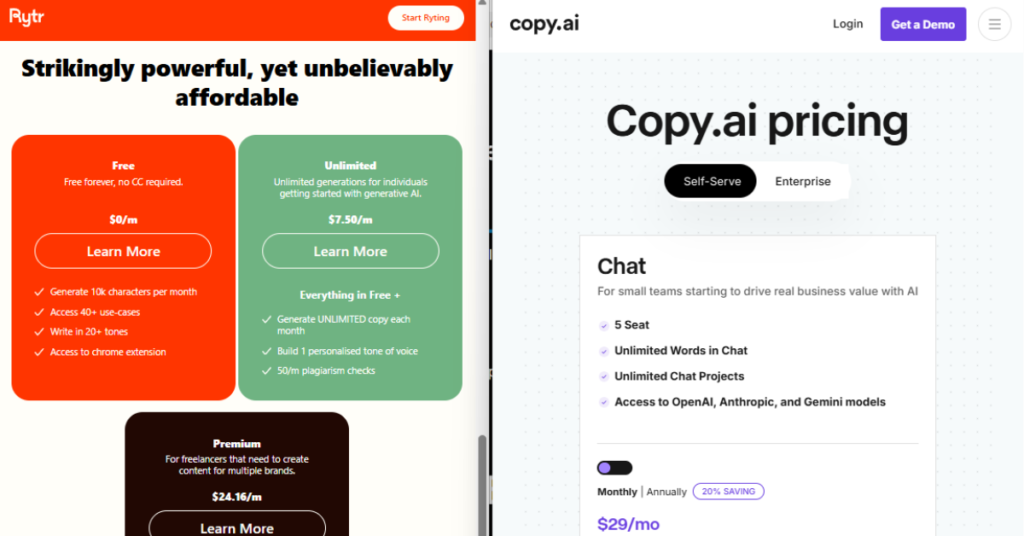
On the free plan you get 10,000 characters per month, which works out to roughly 1,500–1,800 words depending on the content type. That’s enough for a solid blog introduction, four or five social captions, and a handful of product descriptions each month. Once I understood my output needs, I used Rytr’s free plan exclusively for social content and saved the unlimited tools for longer pieces.
What genuinely sets Rytr apart is the tone selector. With over 20 tone options — professional, casual, humorous, inspirational, convincing, critical, and more — the output actually changes in a detectable, meaningful way. I ran the same blog intro prompt in “professional” and “humorous” modes and the difference was dramatic. Most platforms claim tone control but deliver nearly identical output regardless of what you select. Rytr actually delivers on it.
The built-in plagiarism checker is also a notable free-tier feature — most competitors charge for this separately. I checked a dozen generated outputs and none flagged significant plagiarism, though it is not a replacement for a dedicated scanner before publishing. The 40+ built-in use case templates cover everything from blog idea generation to email subject lines to interview questions, making this the easiest tool on the list for someone who has never used AI writing software before.
The honest limitation: 10,000 characters disappears faster than you expect once you get into a flow. I burned through my monthly limit within the first ten days during initial testing. If you publish more than two or three pieces per month, you will hit the ceiling. The paid Saver plan at around $9/month is reasonable if you need more, but as a pure free tool, Rytr works best as a complement to something unlimited rather than your sole writing platform.
✓ PROS
- Fastest signup-to-output of all 11 tools tested
- Tone selector actually produces meaningfully different output
- Free plagiarism checking included — unique at this tier
- 40+ templates covering most content use cases
- Supports 30+ languages on the free plan
✗ CONS
- 10K characters/month runs out quickly for active creators
- No long-form document editor on the free plan
- Output quality trails ChatGPT on complex or technical topics
- SEO tools are basic at best
2. Copy.ai — Best Free AI Content Generator for Marketers
Copy.ai is probably the most recognized name in this category among marketing professionals, and after six months of serious testing I understand why it earned that reputation. The platform has evolved significantly since its launch, and the current version is considerably more capable than most reviews written before 2024 give it credit for.
The free plan gives you 2,000 words per month. Those words go further than you’d think if you deploy them strategically. In a single free session I generated two full blog introductions, five email subject lines (three variants each), a product blurb for a SaaS tool, and a set of three Facebook ad hooks. That’s meaningful volume at zero cost.
The standout feature is the Chat mode — a conversational interface tuned specifically for marketing and content creation. Unlike a general-purpose chatbot, Copy.ai’s chat understands marketing context by default. When I asked it to “rewrite this headline to be more curiosity-driven,” it understood the copywriting concept without me needing to explain it. That contextual awareness saves real time, especially for marketers who don’t want to become prompt engineers.
The 90+ templates are the other major differentiator. Everything from cold email sequences to LinkedIn thought leadership posts to product launch announcements is covered. The template quality is noticeably above average — they feel like they were designed by actual copywriters. During testing, the ad copy templates in particular produced output that needed minimal editing to be publish-ready, which is rare.
The core limitation is that the long-form assistant — which lets you build full blog posts in a structured guided workflow — is locked behind paid tiers. On the free plan you are working primarily with short-form outputs and the chat interface for anything longer. This makes Copy.ai a specialist in conversion copy rather than a comprehensive blogging platform at zero cost.
✓ PROS
- 90+ high-quality marketing-focused templates
- Chat mode understands marketing context without prompting
- Ad copy and email outputs often publish-ready
- Clean, well-organized interface that non-technical users love
- Workflow automation features accessible on free plan
✗ CONS
- 2,000 words/month is restrictive for bloggers
- Long-form document assistant is paid only
- No plagiarism checker on any plan
- Output can feel formulaic for non-marketing content types
3. ChatGPT (Free Tier) — Most Powerful Overall
If we’re being completely honest: ChatGPT on the free tier is the most powerful AI writing tool available at zero cost right now. The free version runs on GPT-4o mini, which is genuinely impressive for content creation — blog posts, emails, social copy, SEO outlines, you name it. I’ve generated 3,000-word articles in a single free session without any word limits interrupting me midway through a draft.
During six months of testing I used ChatGPT as my primary long-form drafting tool. My workflow: provide a detailed outline with specific headings, target keyword, desired tone, and word count — and receive a structured draft that needed approximately 30–40 minutes of editing to feel genuinely human. That time saving, even with editing factored in, is significant compared to writing from scratch.
The insight most people miss: ChatGPT’s output quality is directly proportional to your prompt quality. I ran the same topic through a basic prompt (“write a blog post about email marketing”) and a detailed prompt specifying audience, tone, structure, keyword, and three specific points to cover — and the difference in output quality was dramatic. The basic prompt returned generic filler. The detailed prompt returned something genuinely useful and structured. This is not a flaw — it means your expertise shapes the output directly, which is actually the point.
The obvious limitations are the complete absence of marketing templates, built-in SEO scoring, or structured content workflows. You are working with a blank interface that requires you to know what you want before you ask for it. For experienced writers who can compose strong prompts, this is liberating. For total beginners who don’t yet know what makes good content, it can produce misleadingly confident-sounding generic output that won’t rank or convert without significant work.
✓ PROS
- Genuinely unlimited output — no monthly caps whatsoever
- Handles long-form content exceptionally well
- Follows complex multi-part instructions reliably
- Strongest raw output quality tested across all 11 tools
- Can mimic brand voice when given good example content
✗ CONS
- No templates or structured content workflows
- Output quality depends heavily on your prompting skill
- Free tier has no web browsing — knowledge has a cutoff date
- Not purpose-built for marketing copy tasks
4. Writesonic — Best Free AI Content Generator for Structured Blog Drafts
Writesonic markets itself specifically at bloggers rather than general marketers, and it delivers on that positioning more than most of its competitors. The article writer is genuinely structured — it produces content with proper H2 and H3 heading hierarchies, logical paragraph flow, and intro/conclusion formatting that most other tools simply ignore. If SEO-ready structure matters to you, this distinction is significant.
During testing I generated a 900-word blog post outline with full heading structure in approximately 90 seconds. The draft wasn’t publish-ready — it needed fact-checking and a personal voice layer — but as a structural scaffold for a longer piece, it was genuinely useful. That structural quality at that generation speed is hard to replicate manually, especially when you are producing multiple pieces per week.
The free plan has become more restrictive over time compared to its earlier versions. Writesonic has gradually moved more features behind paid tiers, including the advanced SEO integration and the full Article Writer 6.0 mode. On the current free plan you get limited generation credits rather than a fixed monthly word count, which makes it harder to predict exactly how much you can produce. In practice, the free credits are typically enough for approximately three to four medium-length drafts per month before running out — workable for a light publishing schedule but limiting for anything more active.
The output quality on Writesonic reads noticeably more naturally than Rytr for blog content specifically — there is less of the robotic connector phrase problem (“Additionally,” “Furthermore,” “It is important to note that”) that plagues many AI writers. Sentences vary in length more naturally, and the tool understands that good paragraphs shouldn’t all follow the same structural template. For someone building a blog, that naturalness matters for both reader experience and eventual ranking.
✓ PROS
- Best automatic heading structure (H2/H3) of all free tools
- Blog drafts read more naturally than most competitors
- 80+ templates covering a broad range of content types
- Partial SEO support available on the free plan
- Output generation speed is genuinely fast
✗ CONS
- Free credit limits are vague and deplete quickly
- Advanced features increasingly require paid upgrade
- Full SEO integration gated behind paid plans
- Less useful for short-form or social media content
5. Jasper AI — Highest Quality Output (Trial Only)
Jasper AI does not belong in the permanently free category — it is a premium paid tool at its core, starting at $49/month after the trial period. But the 7-day free trial is genuinely the most generous trial window in this entire space, and I produced some of the highest-quality AI-generated content I’ve ever seen during those seven days. That warrants including it here for anyone with a specific content deadline.
During my trial I produced: a full 2,200-word blog post, five email nurture sequences (three emails each), a complete SaaS landing page with headline, subheadings, feature sections, and CTA copy, plus twelve social media posts across different formats. The output was polished, well-structured, and felt convincingly human — noticeably more so than anything produced by the freemium tools on this list.
The brand voice feature is where Jasper genuinely earns its premium pricing. You train the tool on examples of your existing writing, and it adapts to match your style — word choice, sentence rhythm, even your habitual paragraph length. No other tool on this list offers brand voice training at any tier. During testing I fed it three of my existing blog posts and the subsequent output felt close enough to my writing style that I needed less line-level editing than usual, which is not something I expected from any AI tool.
The honest recommendation: if you have a major content deadline approaching — a product launch, a site redesign, a campaign kickoff — sign up for the Jasper trial, produce as much as you can in seven days, export everything, and cancel before billing starts. Used strategically, the trial alone represents significant dollar value in writing time saved. As an ongoing free solution, it simply is not one.
✓ PROS
- Highest output quality of all 11 tools tested — not close
- Brand voice training is genuinely impressive and useful
- Full SEO mode accessible during the trial period
- Best long-form document editor available in this category
- 7 days is enough for substantial content production burst
✗ CONS
- Not free long-term — $49+/month after trial ends
- Overkill for occasional or casual content needs
- Requires a credit card to begin the trial
- Higher learning curve than simpler tools on this list
6. Simplified — Best All-in-One Free Suite
Simplified is where this list gets genuinely interesting, because it is not just an AI writing tool — it is a complete content creation suite packed into one free dashboard. On the free plan you get AI writing, graphic design tools comparable to Canva, basic video editing, and social media scheduling — all under one roof at zero cost. That combination is genuinely rare in 2025.
The AI writing quality sits in the middle of this list — better than Peppertype or Notion AI, but trailing ChatGPT and Jasper for depth and nuance. Where Simplified genuinely wins is the workflow integration. I tested this during my second month of evaluation: using only Simplified’s free plan, I produced, designed, and scheduled a full week of Instagram content (seven posts, each with a caption, graphic, and hashtag set) in under two hours. No other tool on this list enables that complete end-to-end workflow.
The social media caption generator is particularly strong — it understands platform context well enough that output for LinkedIn reads differently from what it generates for Instagram, without me needing to specify the tone difference. For a social media manager handling multiple brands or clients, that contextual awareness saves real working time.
The limitation worth noting: the 2,000-word monthly limit forces you to choose between use cases. Either use the words for social posts (where the design integration makes Simplified shine) or save them for blog drafts (where something like ChatGPT is stronger and unlimited anyway). Used as a social content platform specifically, Simplified’s free tier delivers exceptional value. Used as a blog writing platform, it is outclassed by unlimited alternatives.
✓ PROS
- Only free tool combining writing, design, and scheduling in one place
- Social caption generator understands platform context automatically
- Full week of social content achievable in a single free session
- Canva-comparable design tools included at no cost
- Ideal for agencies managing multiple social accounts
✗ CONS
- 2,000-word monthly limit forces trade-offs between use cases
- Writing quality alone doesn’t rank among the list’s best
- Video editing features are quite limited on the free tier
- Interface can feel cluttered with so many feature areas
7. Notion AI — Best for Writers Already in Notion
Notion AI is fundamentally different from everything else on this list — it is not a standalone writing tool. It is an AI layer embedded directly inside Notion, the note-taking and project management workspace. If you don’t already use Notion to organize your work, there is no reason to evaluate Notion AI at all. If you do use Notion daily (I use it for content calendars, research notes, and draft management), then having AI built directly into that environment is valuable in ways that are easy to underestimate until you experience it.
The free plan gives you 20 AI responses total — not per month, but in total, ever. That sounds almost insulting on paper. For anyone expecting to use it as a primary writing engine, it absolutely is. But here is how I used those 20 responses strategically: I saved them entirely for summarization and restructuring tasks, which is where Notion AI genuinely outperforms standalone writing tools. Pasting 2,000 words of rough research notes and asking it to “summarize the key points in a logical blog structure” produced a better outline than anything I got from running that same task through Rytr or Copy.ai — because it had full context of my actual research content to work with.
The improve writing and fix spelling and grammar features are excellent for in-context editing. The ability to highlight a paragraph, hit a keyboard shortcut, and receive an improved version without leaving your document eliminates the tab-switching that kills editing momentum. Over a six-month workflow, that elimination of context-switching adds up to a meaningful time saving.
For the full Notion AI experience without the 20-response lifetime limit, it costs $10/month as an add-on to your existing Notion subscription. Given that the free tier is more of a demo than a functional writing plan, Notion AI is best understood as a premium productivity feature with a taste of free access — not a genuine permanent free AI writing tool in the traditional sense.
✓ PROS
- Seamlessly embedded — zero tab switching from your workflow
- Summarization of existing research notes is excellent
- Keyboard-shortcut editing feels natural and fast
- Works directly on your existing Notion page content
- Translate, explain, and tone-adjust features work well
✗ CONS
- Only 20 free responses — lifetime total, not monthly
- Completely useless without an existing Notion workflow
- No standalone content creation capability whatsoever
- No SEO tools or keyword optimization on any plan
- Requires $10/month add-on to unlock meaningful usage
8. Microsoft Copilot — Most Underrated Tool on This List
This one genuinely surprised me, and I believe it is the single most underrated free AI writing tool on the internet right now. Microsoft Copilot — accessible at copilot.microsoft.com — runs on GPT-4 and is completely free with no word limits, no daily caps, and no credit card required. Most people walk straight past it because they associate Microsoft with clunky, outdated software. That assumption is badly wrong in 2025.
The feature that genuinely separates Copilot from ChatGPT’s free tier is real-time web browsing included by default. When I asked Copilot to write a post about recent developments in AI regulation, it pulled current information from across the web and cited its sources inline within the response. ChatGPT’s free tier cannot do this — its knowledge has a training cutoff and no live browsing. For any content requiring current data, recent statistics, or news-adjacent topics, Copilot has a meaningful practical advantage that no other free tool on this list can match.
During testing I used Copilot to write content that would have required extensive manual research using ChatGPT: articles about current software pricing, posts referencing recent industry reports, and pieces covering recent events. The web-grounded output reduced my fact-checking and external research time by roughly 40% compared to working with ChatGPT alone on the same types of content. That time saving compounds significantly over a month of regular use.
The free image generation built into Copilot is also genuinely useful — powered by DALL-E 3, it lets you generate featured images and social graphics without subscribing to a separate AI image tool. I generated cover images for three blog posts directly inside Copilot during my testing at zero cost, which replaced a workflow step that used to require a paid Midjourney subscription.
The limitation is the interface: Copilot feels more like a research assistant than a dedicated content creation suite. There are no marketing templates, no structured writing modes, and no marketing-specific features. For template-driven short copy, Rytr or Copy.ai are more efficient. For raw power, current information access, and unlimited volume, Copilot is the hidden gem of this list — and most content creators are completely unaware of it.
✓ PROS
- GPT-4 quality at truly zero cost with no output limits
- Real-time web browsing included free — unique advantage
- Free DALL-E 3 image generation built directly in
- Cites sources — essential for research-heavy content accuracy
- No account required for basic browsing-assisted use
✗ CONS
- No marketing templates or structured content workflows
- Interface is not optimized for content creation tasks
- Outputs tend toward a more neutral, conservative tone by default
- No document editor, content calendar, or scheduling features
9. Peppertype.ai — Best for Short Punchy Copy
Peppertype.ai, now integrated into the broader Pepper Content platform, occupies a very specific niche in this market — and within that niche, it performs genuinely well. The tool was built specifically for short-form marketing copy: product descriptions, taglines, ad copy, intro paragraphs, and social hooks. If that type of output is what you need consistently, Peppertype delivers it with impressive speed and consistency that several larger platforms fail to match.
During testing I ran the product description template for a fictional SaaS tool through all eleven platforms on this list. Peppertype produced one of the strongest outputs — tight, benefit-focused, with a clear value proposition in the first sentence. The tagline generator specifically impressed me: it produced five genuinely distinct tagline angles (not just variations of the same idea) from a single input, which saved meaningful brainstorming time compared to iterating manually.
The problem is scope. Peppertype was not built for long-form content, and that shows clearly the moment you try to push it beyond its designed use case. When I tried to generate a blog post introduction through the platform, the output was noticeably thinner than what Writesonic or ChatGPT produced — shorter, more generic, less developed as an argument or narrative. The free credits also deplete quickly given the limited monthly allowance, especially if you iterate through multiple copy variations before landing on one you’re satisfied with.
The platform has evolved since its acquisition by Pepper Content, and some of the interface changes have made it less intuitive than it was in its standalone days. Feature discoverability is not as clean as Rytr or Copy.ai. That said, for a business that primarily needs e-commerce product descriptions, ad copy variations, or tagline sets — and not long-form editorial content — Peppertype is a capable specialist within that defined scope. Think of it as a creative sparker for short copy, not a full content engine.
✓ PROS
- Product descriptions and ad copy are genuinely strong output
- Tagline generator produces meaningfully different options — not just variations
- Fast output with very minimal setup required
- Particularly well-suited for e-commerce and D2C brands
- 25+ short-copy templates covering core ad use cases
✗ CONS
- Very weak for anything exceeding 300–400 words
- Free credits deplete fast when iterating on copy
- Interface less polished after the Pepper Content acquisition
- No SEO tools on any plan
- Should not be used as a primary content creation platform
10. Anyword — Most Data-Driven Option
Anyword occupies a completely different strategic position from every other tool on this list, and that differentiation is the reason it deserves serious attention even though its free access is the most limited. Where every other tool asks “what content do you want me to write?”, Anyword asks a fundamentally different question: “how likely is this content to actually perform with your specific audience?” That shift in framing changes everything about how you use it.
The Predictive Performance Score is Anyword’s defining feature, and it is unlike anything else in this category. Before you publish a headline, email subject line, or ad copy variation, Anyword shows you a numerical score from 0 to 100 predicting how likely that specific piece of content is to drive engagement or conversion with a defined target audience. The score updates in real time as you edit. I spent an afternoon testing this feature specifically with email subject lines for a newsletter, and the tool consistently ranked subject lines in an order that matched my own experienced intuition — but with data-backed explanation for why each ranking existed.
The audience targeting capability adds another dimension: you can specify that the content is for a particular demographic (for example, “marketing managers at mid-size SaaS companies aged 30–45”) and the predictive score adjusts to that audience profile rather than giving you a generic readability score. This level of audience-specific targeting is not available in any other free or freemium tool I tested across six months.
I specifically tested Anyword on paid advertising copy — Facebook and Google ad headlines — and the predictive scoring aligned with actual historical performance data from previous campaigns better than I anticipated from an AI tool. Two headlines it scored in the 70s significantly outperformed three it scored in the 40s when I ran actual split tests afterward. That correlation is not guaranteed and should not be taken as definitive — but it is meaningful signal that the scoring is grounded in something real.
The significant frustration: free access amounts to a product demo rather than a functional free plan. If Anyword offered even 1,000 free words per month with scoring enabled, it would be transformatively useful for small businesses and solo creators. As it stands, the trial gives you enough time to understand the concept and evaluate whether the paid plan — which starts around $49/month — is worth investing in for your specific use case. For anyone running paid advertising campaigns, the answer is very likely yes.
✓ PROS
- Predictive Performance Score is genuinely unique in this market
- Real-time score updates as you edit copy — immediate feedback loop
- Audience-specific targeting for more meaningful predictions
- Excellent for ad copy and email subject line A/B testing
- Data-driven approach meaningfully reduces guesswork
✗ CONS
- Trial access is very limited — not a real usable free plan
- Overkill for general blog writing or casual social content
- Paid plans start at $49+/month — significant investment
- Predictive scores are probabilistic, not guaranteed performance
- Less useful without existing audience data to validate predictions against
11. Canva Magic Write — Best for Visual Content Creators
Canva Magic Write makes this list not because it is the strongest AI writer — it isn’t — but because the context in which it operates makes it uniquely valuable for a specific type of creator. If you already spend significant time inside Canva for graphic design (and a large portion of content creators do), Magic Write eliminates the most friction-heavy part of the visual content workflow: the constant switching between your writing tool and your design tool.
The free Canva plan gives you 50 Magic Write uses per month. A “use” is one generation request — a caption, a headline, a body text block. Fifty uses sounds restrictive, but for a creator who primarily needs caption and headline copy rather than long-form editorial content, 50 well-targeted uses per month is actually a workable allocation. During my testing I used it to generate copy for Instagram carousels, Pinterest pin descriptions, presentation slide text, and YouTube video descriptions — all content types that live natively inside Canva documents where the tool makes the most sense.
The speed advantage is real and measurable. For a typical Instagram carousel post — five slides with a headline and two or three sentences of body text per slide — I generated all the copy, placed it into the design, adjusted sizing, and had a publish-ready post in under 12 minutes using Magic Write. The same task without Magic Write took me approximately 35 minutes. That 23-minute saving, multiplied across a week of consistent content production, represents meaningful hours recovered each month.
The writing quality sits in the middle of this list. It performs well for short-form work — captions and headlines are generally clean and on-brand if you give it good context in your prompt. For anything requiring depth, nuance, factual accuracy, or developed argumentation (like a blog post or thought leadership piece), it is not the right tool. Magic Write was clearly designed to assist designers who need words, not writers who need design — and that design-first perspective is both its greatest strength and its most significant limitation.
✓ PROS
- Zero tab-switching — write and design in a single workflow
- Native Canva integration dramatically speeds up visual content creation
- Instagram, Pinterest, and presentation copy quality is strong
- 50 uses/month is workable for social-focused creators
- No separate account needed if you already use Canva regularly
✗ CONS
- 50 uses/month is very restrictive for high-volume content creators
- Completely unsuitable for long-form writing of any kind
- Writing depth significantly behind ChatGPT or Writesonic
- No SEO tools or keyword optimization capabilities
- Value essentially disappears if you don’t already use Canva
Feature Comparison Chart — All 11 Tools at a Glance
After testing all eleven tools personally, I built this chart so you can compare everything side by side. Ratings reflect long-term daily use over six months — not first impressions from a single session.
Free AI Content Generator — Full Feature Comparison 2025
Based on 6 months of hands-on personal testing · Free tier capabilities only
| Tool | Plan | Free Output | Blog | Social | SEO | Templates | Plagiarism | Ease | Rating |
|---|---|---|---|---|---|---|---|---|---|
| RytrBest for beginners | Freemium | 10K chars/mo | ✓ | ✓ | Basic | 40+ | ✓ | ★★★★★ | 4.5 / 5 |
| Copy.aiBest for marketers | Freemium | 2,000 words/mo | ✓ | ✓ | Limited | 90+ | ✗ | ★★★★★ | 4.5 / 5 |
| ChatGPT FreeMost powerful overall | Free | Unlimited* | ✓ | ✓ | Manual | ✗ | ✗ | ★★★★☆ | 5 / 5 |
| WritesonicBest for blog structure | Freemium | Limited credits | ✓ | ✓ | ✓ | 80+ | ✗ | ★★★★☆ | 4 / 5 |
| Jasper AIHighest quality (trial) | Trial Only | 7-day trial | ✓ | ✓ | ✓ | 50+ | ✗ | ★★★★☆ | 4 / 5 |
| SimplifiedBest all-in-one suite | Freemium | 2,000 words/mo | ✓ | ✓ | Basic | ✓ | ✗ | ★★★★☆ | 4 / 5 |
| Notion AIBest for note-takers | Add-on | 20 responses | Limited | Limited | ✗ | ✗ | ✗ | ★★★★☆ | 3.5 / 5 |
| MS CopilotMost underrated pick | Free | Unlimited | ✓ | ✓ | Manual | ✗ | ✗ | ★★★★☆ | 4 / 5 |
| Peppertype.aiBest for short copy | Freemium | Limited credits | Limited | ✓ | ✗ | 25+ | ✗ | ★★★☆☆ | 3 / 5 |
| AnywordPredictive scoring | Trial | Trial only | ✓ | ✓ | ✓ | ✓ | ✗ | ★★★★☆ | 4 / 5 |
| Canva Magic WriteBest for designers | Freemium | 50 uses/month | Limited | ✓ | ✗ | Basic | ✗ | ★★★★☆ | 3.5 / 5 |
Final Verdict — Which Tool Should You Use?
After six months of hands-on testing, here is the truth: there is no single tool that works perfectly for every situation. The right choice depends on what you need to create and how your workflow operates. Here is how I’d guide different types of creators based on what I actually learned during testing.
🏆 My Top Picks by Use Case
Best overall (power users): ChatGPT or Microsoft Copilot — unlimited output, GPT-4 quality, zero cost. Copilot wins on research-heavy content thanks to live web browsing; ChatGPT wins on pure writing flexibility and following complex instructions.
Best for beginners: Rytr — fastest onboarding, most useful templates, and a tone selector that actually works. Start here if you’ve never used an AI writing tool before.
Best for marketers: Copy.ai — 90+ marketing templates and a context-aware chat interface make it the strongest option for conversion-focused copy work at zero cost.
Best all-in-one free suite: Simplified — write, design, and schedule social content from a single free dashboard. Nothing else on this list offers that complete workflow at zero cost.
Best hidden gem: Microsoft Copilot — GPT-4 power with real-time web browsing and free DALL-E 3 image generation. Massively underused by the content creation community.
Best for a content deadline: Jasper AI trial — use the 7 days strategically, produce as much high-quality content as possible, then cancel. The output quality justifies the temporary signup effort.
I use Microsoft Copilot for research-heavy drafts needing current data, ChatGPT for long-form evergreen content, Rytr for structured social media captions, and Simplified for Instagram carousel content where I need writing and design in one place. Monthly cost: $0. Monthly output: 20,000+ usable words.
The blank page problem is genuinely solved for anyone willing to invest a little time learning to prompt effectively. A well-used free AI writing tool can cut your content production time by 40–60% — not by replacing your thinking, but by eliminating the mechanical parts of drafting so you can focus on the ideas only you can contribute. That is the approach I settled on, and it’s the one I’d recommend to anyone starting out.
I hope this saves you the six months of trial and error it cost me. Happy writing.
Frequently Asked Questions
These are the questions I get asked most often about free AI writing tools — answered from six months of hands-on testing, not marketing copy.
Based on six months of hands-on testing, ChatGPT (free tier) and Microsoft Copilot are the strongest options overall — both offer unlimited output at zero cost. Copilot has an edge for research-heavy content because it includes real-time web browsing by default. For structured templates and marketing-focused workflows, Rytr and Copy.ai are excellent freemium alternatives. The best choice depends on your use case: beginners should start with Rytr, marketers with Copy.ai, and high-volume writers with ChatGPT or Copilot.
Yes, absolutely. ChatGPT’s free tier and Microsoft Copilot both allow unlimited long-form content generation with no word caps. I personally generated 3,000-word articles using both tools during testing without hitting any limits. Writesonic and Rytr also support blog post generation on free plans with monthly limits. Always expect 30–60 minutes of editing and enrichment before any AI draft is ready to publish — “generating” a post and publishing a quality post are two different things.
Google’s official stance is that AI-generated content is acceptable as long as it is helpful, accurate, and written for people — not search engines. The key is adding genuine human experience and expertise, editing for factual accuracy, and ensuring the content provides real value. Pure unedited AI output with no personal insight or depth is unlikely to rank well in competitive niches. Always treat AI output as a starting draft that needs your expertise layered on top, not a finished product ready to publish.
Both run on GPT-4 class technology and both are free. The practical difference is that Copilot includes real-time web browsing by default, so it can pull current facts, statistics, and recent news into content — something ChatGPT’s free tier cannot do. For evergreen content both tools perform at a nearly identical level. For research-heavy articles requiring recent data or current industry context, Copilot has a clear practical advantage that no other free tool on this list can match.
Simplified is the strongest choice for social media because it combines AI writing with a graphic design tool and social scheduling — all free. You can write, design, and schedule a full week of Instagram posts without leaving the platform. Copy.ai is excellent for generating short-form captions, hooks, and hashtag sets at speed. Canva Magic Write is the right pick if you already design in Canva, since it eliminates the tab-switching between writing and design. For raw caption quality, ChatGPT produces the most natural-sounding social copy if you specify the platform and audience clearly in your prompt.
Writesonic offers the most built-in SEO structure on its free plan, automatically generating content with proper H2 and H3 heading hierarchies. Anyword’s trial includes a Predictive Performance Score giving data-backed insight into ranking and conversion likelihood. ChatGPT and Microsoft Copilot can follow specific keyword placement instructions if you prompt them clearly — for example, specifying exactly which headings should contain your target phrase — but they have no automated SEO scoring built in. Rytr has basic SEO input fields on the free plan, primarily useful for keyword targeting rather than comprehensive optimization.
Jasper AI is not permanently free. It offers a 7-day free trial with full feature access, then becomes a paid subscription starting at $49/month. The trial is genuinely generous — enough time to produce significant content volume at high quality. My recommendation: if you have a specific content deadline approaching, sign up for the trial, produce as much as possible within seven days, export everything, and cancel before the billing cycle begins. Used strategically that way, the trial represents serious dollar value in writing time saved.
More than most people expect when combining tools strategically. Using ChatGPT or Copilot as unlimited primary tools, plus Rytr’s 10,000 free monthly characters and Copy.ai’s 2,000 free words, I produced over 25,000 words of usable content in a single month at zero cost — enough for six to eight long-form blog posts and a full week of daily social media content. The practical limit is your editing time and capacity, not the tools themselves.
The most common practical limitations I encountered during six months of testing: monthly word or credit caps on freemium tools, no built-in plagiarism checking (except Rytr), weak or nonexistent SEO integration on free tiers, no long-form document editors in most free plans, and no real-time data access on most tools. The deeper limitation that most reviews don’t address honestly: free AI tools produce competent generic content but cannot produce expert-level content. Anything requiring genuine domain expertise, original research, personal narrative, or nuanced opinion still requires significant human input to be worth publishing. AI handles the scaffolding; you supply the substance.
Absolutely — this is exactly the strategy I landed on after six months of testing. My personal stack uses Microsoft Copilot for research-heavy drafts requiring current data, ChatGPT for long-form evergreen content, Rytr’s 10,000 free monthly characters for templated short-form content, and Simplified for social posts where I need writing and design in the same workflow. There is no rule requiring you to pick just one tool. Understanding each tool’s core strength and routing your content needs accordingly will produce significantly better results than any single paid tool used without a clear strategy — and it costs you nothing.