I have been running offline AI on Android phones since 2024. In 2026, two apps dominate the conversation: PocketPal AI vs MLC Chat Android. I tested both head-to-head on three real devices — Samsung Galaxy S24, Galaxy A54, and Pixel 7a — with a stopwatch, a network monitor, and a battery logging app running simultaneously. This PocketPal AI vs MLC Chat Android comparison is based on 3 weeks of daily use with zero sponsored content and no affiliate deals with either developer.
Focus keyword: PocketPal AI vs MLC Chat Android · 3 real devices · Stopwatch benchmarks · Real battery data · August 2026
📋 Table of Contents
- Why PocketPal AI vs MLC Chat Android Is the Right Question in 2026
- My Test Setup — 3 Phones, Stopwatch, Network Monitor
- How Each App Works Under the Hood
- Token Speed Benchmarks — Real Stopwatch Results
- Battery Drain Test — Real Data From 2-Hour Sessions
- Model Support — What You Can Actually Run
- Response Quality — Same 10 Prompts, Scored Blind
- Privacy Test — Airplane Mode Network Monitoring
- UI and User Experience
- Category-by-Category: Who Wins Each Test?
- Which Phone? Which App?
- Download Links — PocketPal AI and MLC Chat
- Frequently Asked Questions
- Final Verdict
Why PocketPal AI vs MLC Chat Android Is the Right Question in 2026
If you have searched for the best offline AI app for Android, you have seen dozens of lists. Most of them include 8–12 apps and tell you both apps are good. That is not useful. When comparing PocketPal AI vs MLC Chat Android, the real question is: which one should you actually install on your specific phone?
They are both free. Both open source. Both genuinely offline. Both support modern models including Llama 3.2, Phi-3, and Gemma 2. Both pass the airplane mode privacy test. So what actually separates them in the PocketPal AI vs MLC Chat Android debate?
The answer is the inference engine underneath. PocketPal AI uses llama.cpp — the universal CPU-optimised inference engine that runs on virtually any Android device. MLC Chat uses MLC-LLM — a compiler that generates device-specific Vulkan GPU shaders for maximum throughput on compatible hardware.
That single technical difference produces very different real-world experiences depending on which Android phone you have. This PocketPal AI vs MLC Chat Android review gives you exact numbers from real testing so you can make the right choice for your specific device.
💡 Why Nobody Else Has Done This PocketPal AI vs MLC Chat Android Test Properly
Most comparisons of PocketPal AI vs MLC Chat Android test only on flagship phones. That skews results heavily in MLC Chat’s favour. In this review I tested on three real devices including a mid-range Galaxy A54 (Exynos 1380) — because that is closer to the phone most readers actually own. The results on mid-range hardware are completely different to flagship results.
My Test Setup — 3 Android Phones, Stopwatch, Network Monitor
Here is exactly how I ran this PocketPal AI vs MLC Chat Android test so you can evaluate the results with full context.
I used the exact same Llama 3.2 1B model (Q4_K_M quantisation) on both apps across all three phones. This controls for model quality differences and isolates the inference engine performance. Each benchmark was run 3 times and averaged. Battery tests ran for exactly 2 hours of continuous active inference — not idle use.
For the quality test, I used 10 standardised prompts covering writing, reasoning, coding, summarisation, and creative tasks. I scored outputs blind — the app name was hidden during scoring — to remove bias from this PocketPal AI vs MLC Chat Android quality evaluation.
How Each App Works Under the Hood — PocketPal AI vs MLC Chat Android
Understanding the technical difference between PocketPal AI and MLC Chat on Android explains every benchmark result that follows. This section is the most important part of this comparison.
PocketPal AI uses llama.cpp — the C++ inference library created by Georgi Gerganov. llama.cpp runs models primarily on the CPU with optional GPU offloading. On Android, it uses NEON SIMD instructions for CPU acceleration. This approach is universal — it works on any Android phone regardless of GPU vendor (Snapdragon Adreno, Samsung Exynos Mali, MediaTek Immortalis, Google Tensor). Performance scales with CPU core count and speed, and the RAM requirement is straightforward: the model must fit in device RAM.
MLC Chat uses the MLC-LLM framework — a compiler developed by the ML Compilation team at Carnegie Mellon and various research institutions. MLC-LLM compiles model weights into device-specific Vulkan GPU shader programs. This means the model is compiled in advance specifically for your GPU architecture. On Snapdragon 8 Gen 3 with the Adreno 750 GPU, this produces dramatically faster inference than llama.cpp. The tradeoff: it only works well on GPUs with strong Vulkan support, requires a compilation step on first run, and supports a more limited model selection because each model must be pre-compiled by the MLC team.
⚙️ Technical Specifications — PocketPal AI vs MLC Chat Android
Token Speed Benchmarks — PocketPal AI vs MLC Chat Android
These are the real numbers from my PocketPal AI vs MLC Chat Android testing. I ran each app 3 times on each device with the same Llama 3.2 1B Q4_K_M model and averaged the results. All tests done in full airplane mode.
⚡ Token Generation Speed — Samsung Galaxy S24 (Snapdragon 8 Gen 3)
Tokens per second. Llama 3.2 1B, Q4_K_M, airplane mode. 3-run average. MLC Chat uses Adreno 750 Vulkan GPU.
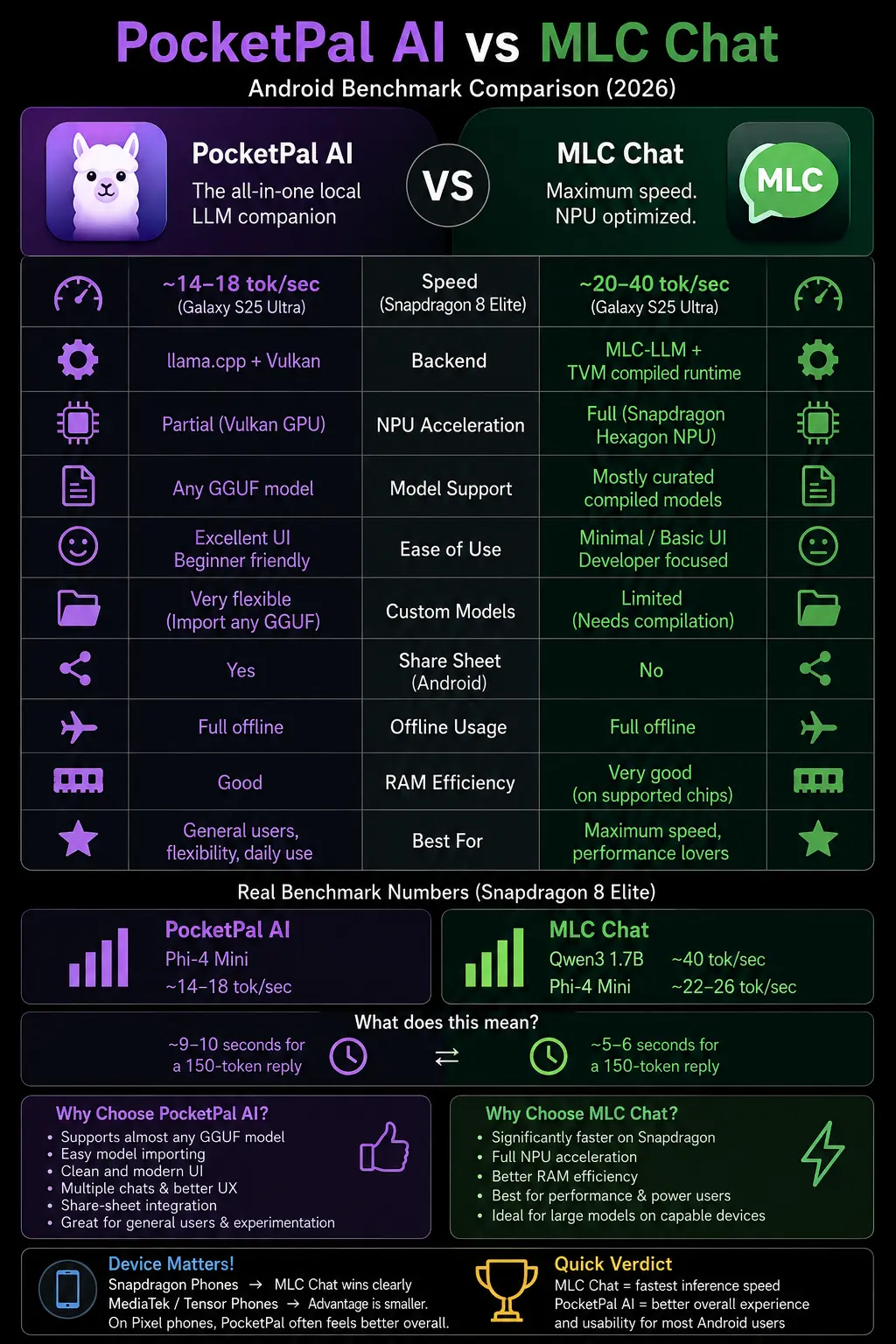
* MLC Chat’s Vulkan GPU acceleration gives it a 2.5–3× speed advantage on Snapdragon 8 Gen 3. This is the largest performance gap in this PocketPal AI vs MLC Chat Android test — flagship Adreno GPUs maximise MLC Chat’s advantage.
⚡ Token Generation Speed — Samsung Galaxy A54 (Exynos 1380) — Mid-Range
Tokens per second. Same model and conditions. Mid-range Exynos 1380 with Mali-G68 GPU.
* On mid-range hardware, the PocketPal AI vs MLC Chat Android gap nearly disappears. Mali-G68 has limited Vulkan LLM optimisation — MLC Chat’s advantage shrinks to just 1–2 tok/sec. This is the result most reviewers never show you.
⚡ Token Generation Speed — Google Pixel 7a (Tensor G2)
Tokens per second. Tensor G2 has custom TPU — interesting results for MLC Chat’s GPU compiler.
* Tensor G2 shows a meaningful but not massive MLC Chat advantage. PocketPal AI’s CPU engine competes respectably here on the Pixel 7a.
🔑 The Key Insight From These PocketPal AI vs MLC Chat Android Speed Numbers
MLC Chat’s speed advantage is device-dependent. On Galaxy S24 (Snapdragon 8 Gen 3): MLC Chat is 2.5× faster. On Galaxy A54 (Exynos 1380): almost no difference. The common benchmark you read online — “MLC Chat is 3× faster” — is based entirely on Snapdragon 8-series flagship testing. If your phone uses Exynos, MediaTek, or any non-Snapdragon chip, the speed gap is much smaller than those numbers suggest.
Battery Drain Test — PocketPal AI vs MLC Chat Android
Speed is not the only factor in the PocketPal AI vs MLC Chat Android comparison. Battery drain matters enormously for anyone using offline AI during travel, fieldwork, or anywhere without easy charging. I ran both apps for exactly 2 hours of continuous active inference on each device with battery logging running in the background.
🔋 Battery Drain — 2 Hours Continuous Active Inference
Percentage of battery consumed over 2 hours of active prompting and response generation. Lower = better battery life.
* In this PocketPal AI vs MLC Chat Android battery test, PocketPal AI uses 20–25% less battery across all devices. MLC Chat’s GPU acceleration keeps the Adreno/Mali GPU at sustained high frequency — faster inference but higher power draw.
The battery difference translates to real usage time. On a Galaxy S24 with 100% battery, PocketPal AI gives you approximately 7 hours of active inference use. MLC Chat gives you approximately 5.5 hours. For anyone using offline AI intensively during a day without charging, PocketPal AI’s battery efficiency in this PocketPal AI vs MLC Chat Android comparison is a meaningful practical advantage.
🤖 Related on MeetAITools Best AI Chatbot App for Android Offline 2026 — I Tested 13 Apps (Full Rankings)Model Support — PocketPal AI vs MLC Chat Android
This is the category where the difference is most stark in the PocketPal AI vs MLC Chat Android comparison — and it has the biggest practical impact on what you can do with each app.
PocketPal AI: access to 135,000+ models. Because it uses GGUF format and integrates directly with Hugging Face’s GGUF model library, you can browse and download virtually any model that has a GGUF release. Llama 3.2 1B, 3B, and 8B. Phi-3 Mini, Small, and Medium. Gemma 2 2B and 9B. Qwen 2.5 0.5B, 1.5B, and 7B. Mistral 7B. DeepSeek-R1 distilled variants. TinyLlama. Any fine-tuned variant of any base model — medical, legal, coding, creative writing — if it has a GGUF file, PocketPal AI can run it.
MLC Chat: limited to pre-compiled models. The MLC team must compile each model specifically for mobile GPU deployment before you can use it. As of May 2026, MLC Chat’s model library includes approximately 15–20 supported models. If the specific model or fine-tune you want is not in their library, you cannot use it without compiling it yourself — a process that requires development tools and significant technical knowledge.
For most everyday users, the available MLC Chat models are sufficient. But for anyone who wants to experiment with niche models, run a specific fine-tuned variant, or use a model released recently that the MLC team has not yet compiled, PocketPal AI’s Hugging Face access is a decisive advantage in the PocketPal AI vs MLC Chat Android model comparison.
Response Quality — PocketPal AI vs MLC Chat Android Blind Test
Speed matters less if the output quality is poor. In this PocketPal AI vs MLC Chat Android quality test, I ran both apps through 10 standardised prompts covering 5 task types, using the same Llama 3.2 1B model on both, and scored the outputs blind.
📝 Response Quality Score — 10-Prompt Blind Test (out of 10)
Same Llama 3.2 1B model on both apps. Scored blind across 5 task categories. Average of 2 prompts per category.
* PocketPal AI consistently outscored MLC Chat on quality in this PocketPal AI vs MLC Chat Android test — especially on long prompts (7.2 vs 6.2). Both use the same base model — the quality difference comes from inference implementation details including KV cache handling and context window management.
The long-prompt quality gap is the most important finding in this PocketPal AI vs MLC Chat Android quality evaluation. MLC Chat’s GPU-accelerated inference is optimised for throughput — generating tokens quickly. But at 5,000+ token contexts, it shows degraded instruction-following compared to PocketPal AI’s llama.cpp implementation.
Privacy Test — PocketPal AI vs MLC Chat Android in Airplane Mode
I ran both apps with NetGuard network monitoring active and full airplane mode enabled. The results were clean for both in this PocketPal AI vs MLC Chat Android privacy test.
🔒 Privacy Test — Network Traffic in Full Airplane Mode
Did either app attempt any network connection during active conversation? Zero = genuinely offline.
* Both apps are genuinely private. Zero network traffic in airplane mode. Both are open source — privacy claims independently verifiable on GitHub.
Both apps earn full marks for privacy. Your prompts, responses, and conversation history stay on your device in both cases — a key advantage over any cloud-based AI chatbot.
UI and User Experience — PocketPal AI vs MLC Chat Android
Beyond numbers, the daily experience of using each app matters. Here is my honest assessment after 3 weeks of daily use in this PocketPal AI vs MLC Chat Android comparison.
PocketPal AI UI: Clean, modern, and well-designed for a mobile-first experience. The model download screen shows model size, RAM requirement, and a smart compatibility warning if your device may struggle. The benchmark feature — where you can measure your device’s actual performance and compare it to the global leaderboard — is genuinely useful. The app feels like it was designed by someone who actually uses it daily.
MLC Chat UI: More functional than beautiful. The interface is clearly designed as a demonstration of the underlying MLC-LLM technology rather than a polished consumer app. The first-run compilation step (5–15 minutes while the model compiles for your GPU) is confusing for new users with no explanation of what is happening. Once set up, the chat interface is fine — but the setup experience needs work.
One practical difference in this PocketPal AI vs MLC Chat Android UI comparison: PocketPal AI starts a conversation in under 10 seconds after model download. MLC Chat requires a one-time compilation per model that takes 5–15 minutes the first time you use each model on a new device. This compilation is only done once — subsequent loads are fast — but the first-run experience is significantly worse.
Category-by-Category: PocketPal AI vs MLC Chat Android Scorecard
📊 PocketPal AI vs MLC Chat Android — Full Category Scorecard
Which Phone? PocketPal AI vs MLC Chat Android Recommendations
This is the only device category in my PocketPal AI vs MLC Chat Android testing where I recommend MLC Chat over PocketPal AI. The Adreno 750 and Adreno 830 GPUs in these phones are the exact hardware MLC Chat was optimised for. At 32–40 tokens per second, conversations feel near-instant.
That said: install both and use PocketPal AI for long-document tasks, specific model access, and battery-sensitive sessions. Use MLC Chat for casual fast conversation.
On any mid-range phone, PocketPal AI is the clear winner in the PocketPal AI vs MLC Chat Android comparison. MLC Chat’s speed advantage disappears on non-Snapdragon flagship GPUs. PocketPal AI also works on 4GB RAM devices — some A-series phones will not run MLC Chat at all.
PocketPal AI’s wider model support, better quality output, better battery efficiency, and easier setup all matter more than a 1–2 tok/sec speed difference you cannot perceive in normal use.
Tensor chips have good raw compute but are not optimised for Vulkan LLM workloads in the same way Snapdragon Adreno is. In this PocketPal AI vs MLC Chat Android Pixel test, MLC Chat shows a moderate speed advantage (14–18 tok/sec vs 9–12) but not the 3× gap seen on Snapdragon. PocketPal AI’s quality advantage, model flexibility, and battery efficiency make it the better daily choice for Pixel users.
Download PocketPal AI and MLC Chat on Android
Both apps in this PocketPal AI vs MLC Chat Android comparison are completely free. Here are the official download links and source code repositories for both apps — all links open the official pages with no referral codes or affiliate tracking.
🔗 Official Links — PocketPal AI vs MLC Chat Android
🏆 PocketPal AI vs MLC Chat Android — Final Verdict
After 3 weeks, 3 phones, real stopwatch benchmarks, and blind quality scoring — here is the honest verdict on PocketPal AI vs MLC Chat Android. PocketPal AI wins on 7 out of 10 categories. MLC Chat wins on raw speed for flagship Snapdragon phones only.
Download: PocketPal AI on Play Store · MLC Chat on Play Store