Free AI Tax Deduction Finder for Small Business — No Bank Login Required
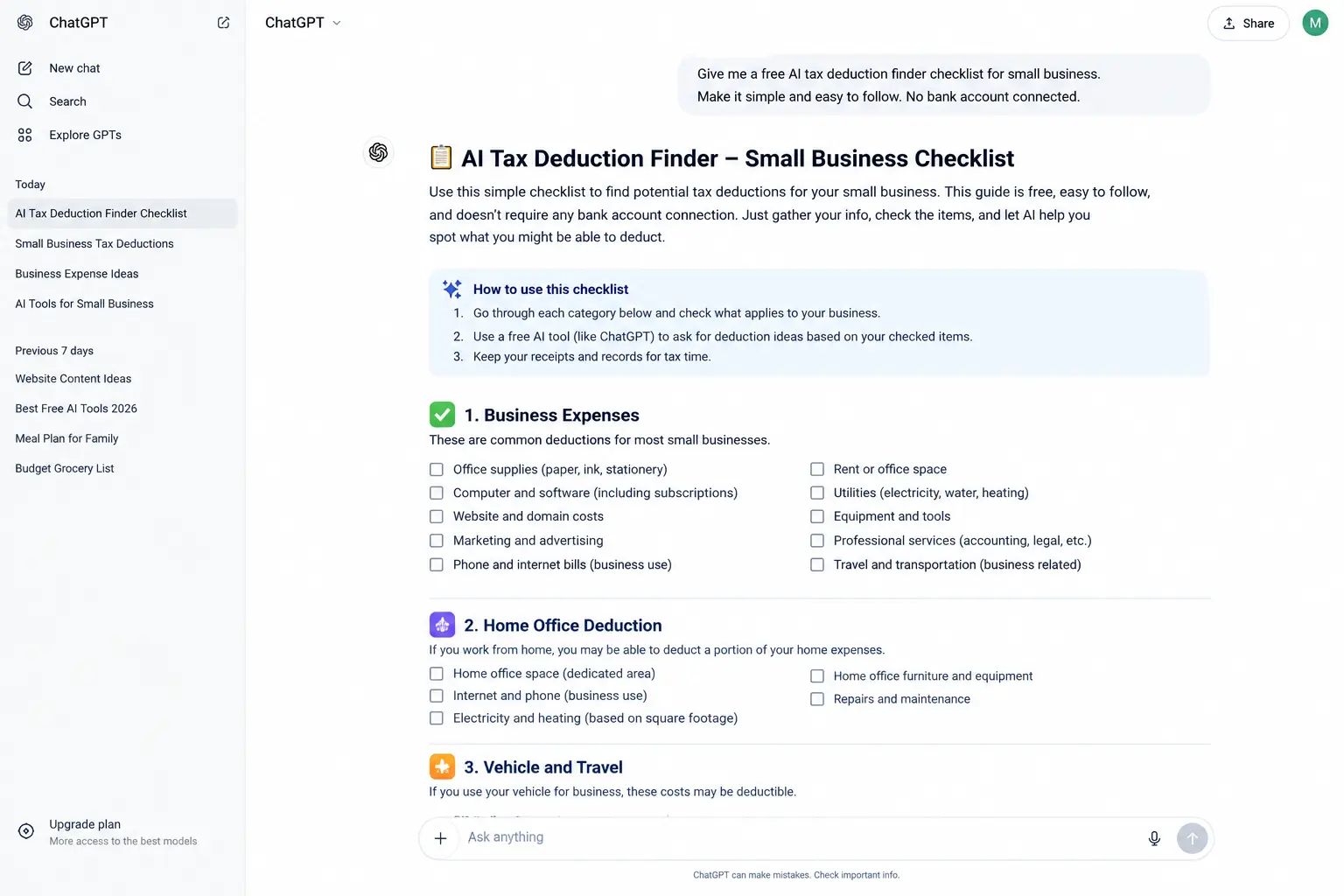
Every AI tax deduction finder we found wants your bank account connected. Here’s a genuinely free way to get organized before you see your accountant — no login, no linked cards.Yes — but it works differently than the apps you’ll find first. Dedicated AI tax deduction finder apps like Everlance, TaxPilot, and WriteOff all require connecting your bank account, because that’s how they scan your real transactions automatically. A genuinely free AI tax deduction finder with no bank login means describing your business expenses manually to ChatGPT or Claude, which builds you a checklist of deduction categories to bring to a real accountant — at no cost, with nothing linked.
This article is educational, not tax advice. Nothing here replaces a licensed CPA or enrolled agent who knows your specific business, state, and situation. AI tools are genuinely useful for organizing your thinking and catching categories you might’ve forgotten — they cannot verify your actual eligibility or file anything on your behalf. Treat every deduction mentioned here as “something to ask your accountant about,” not a confirmed write-off.
Search for an AI tax deduction finder for small business and you’ll land on a wall of real, funded apps — Everlance, TaxPilot, TaxLens, WriteOff, SnapTax. Every single one asks you to connect your bank account before it can do anything. That makes sense for how they work — they scan your actual transactions — but it means there’s no genuinely free AI tax deduction finder with a true no-login option among any of them.
So here’s the honest alternative: a free, private way to build your own deduction checklist using ChatGPT or Claude, based on what you already know about your business — no bank connection, no subscription, no waiting for a free trial to expire.
Why Every AI Tax Deduction Finder App Wants Your Bank Connected
This isn’t a design flaw — it’s the whole business model. Apps like WriteOff and Everlance work by scanning your real transactions through a service called Plaid, flagging anything that looks like a deductible business expense automatically. That automation genuinely saves time once it’s set up, and if you’re already comfortable linking a financial account to a well-reviewed app, it’s a legitimate option.
But if you’d rather not connect a bank account to a third-party app — a completely reasonable position — none of the popular dedicated tools currently offer that choice. That’s the real gap this guide fills.
A bank-connected app catches deductions automatically from transactions you might forget about. A manual, no-login approach with ChatGPT or Claude requires you to actually remember and type in your expenses — more effort, but zero data shared with a third party beyond what you choose to type.
Free AI Tax Deduction Finder vs. Paid Apps — What You Give Up Going Free
| What matters | Free (ChatGPT/Claude) | Paid apps (Everlance, WriteOff, etc.) |
|---|---|---|
| Monthly cost | $0 | $0–$40/mo after trial |
| Bank account required | Never | Yes, via Plaid or similar |
| Scans real transactions automatically | No — manual entry | Yes |
| Builds a starting deduction checklist | Yes | Yes |
| Replaces a real CPA | No — neither does | No — neither does |
| Setup time | A few minutes | Account linking + verification |
How to Use ChatGPT as a Free AI Tax Deduction Finder — The Prompt
Copy this, fill in your real details, and paste it into ChatGPT or Claude.
The output won’t file anything or guarantee accuracy — but it’s a genuinely useful starting point to walk into a CPA conversation already organized, instead of starting from a blank page.
Deduction Categories Worth Asking Your Accountant About
These are commonly available categories for small business owners — general starting points, not confirmed for your specific situation.
If you have a space used regularly and exclusively for business, a portion of rent, utilities, and insurance may qualify. The exact percentage and eligibility rules matter — worth confirming directly.
Business driving is generally deductible using either the standard mileage rate or actual vehicle expenses. Keeping a running log as you go — even a simple note — makes this far easier at filing time than reconstructing it later.
Tools you pay for to run your business — design software, project management apps, even this kind of AI subscription — are commonly deductible business expenses.
Courses, certifications, industry books, and professional memberships related to your work often qualify — frequently overlooked because they don’t feel like typical “business expenses.”
Business meals with clients are generally partially deductible, with specific record-keeping requirements — who attended and what was discussed matters for your records.
For the current, official rules on any of these, the IRS Small Business and Self-Employed Tax Center is the authoritative source — worth bookmarking alongside whatever checklist you build.
The Honest Bottom Line on Free AI Tax Deduction Finders
If you want deductions found automatically from your real spending with zero manual entry, a paid app that connects to your bank is genuinely the more complete tool — that convenience is what you’re paying for. But if you’d rather keep your bank details disconnected from a third-party app entirely, using ChatGPT or Claude as a free AI tax deduction finder can build you a real, useful starting checklist for free, that you then bring to an actual accountant to verify. Neither path replaces professional advice — think of this as showing up to that appointment already organized, instead of starting from zero.
Frequently Asked Questions